
🔬 1. So, what did we learn till now?
In the last lesson, we learned that RAM is made up of billions of memory cells, each holding a bit (0 or 1). But we didn’t explain how those cells actually store information.
👉 The answer lies in two tiny components:
-
Transistors (electronic switches)
-
Capacitors (tiny buckets that hold electric charge)
Together, they make storing and accessing digital data possible.
2. The Concept of 1s and 0s
Computers think in binary:
-
1 = ON = has voltage/charge
-
0 = OFF = no voltage/charge
RAM’s job is to physically represent these 1s and 0s using electrical states.
So every time you type a letter, move your mouse, or open a file, billions of these 1s and 0s are flipping inside RAM cells at incredible speed.
3. What is a Capacitor?
A capacitor is a simple electronic part that stores electricity—like a tiny rechargeable battery.
-
If it has charge → Represents a 1
-
If it has no charge → Represents a 0
But capacitors are leaky. Over time, the charge drains away. That’s why RAM must constantly refresh cells to keep data alive.
👉 Imagine a bucket with a hole in it. If you pour water in, it will eventually leak out. To keep it full, you must refill it regularly. That’s exactly how capacitors behave.
4. What is a Transistor?
A transistor is a microscopic electronic switch.
-
It controls whether electricity flows or not.
-
In RAM, it acts like a valve that lets the CPU read or write to the capacitor.
So in a RAM cell:
-
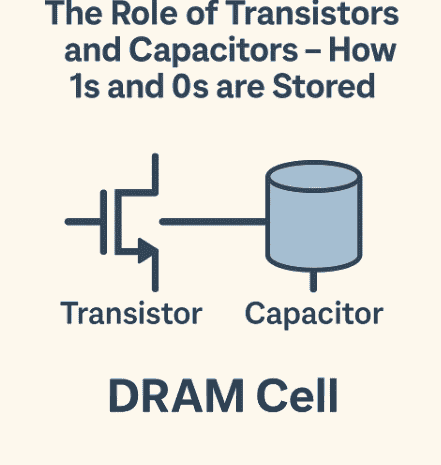
Capacitor = bucket that stores the bit
-
Transistor = door that controls access
Without the transistor, you couldn’t reliably read/write the bit inside the capacitor.
5. The DRAM Cell (Dynamic RAM)
In Dynamic RAM (DRAM):
-
Each cell uses 1 capacitor + 1 transistor.
-
It’s very space-efficient → billions of cells fit on a chip.
-
But it’s unstable, since capacitors leak and need constant refreshing.
That’s why it’s called dynamic—the data is always changing and needs maintenance.
6. The SRAM Cell (Static RAM)
In Static RAM (SRAM):
-
Each cell uses 6 transistors (no capacitors).
-
Data stays stable as long as power is on—no refresh needed.
-
Faster and more reliable.
-
But takes up more space, so you can’t pack as many cells.
That’s why SRAM is used for CPU caches, while DRAM is used for main memory.
👉 Think of DRAM as cheap apartments in a tall skyscraper (lots of people packed in, but maintenance required), and SRAM as luxury villas (fewer in number, but no constant fixing needed).
7. Reading and Writing a Bit in DRAM
Let’s follow the steps:
Writing a 1
-
CPU says “store 1 at this address.”
-
Memory controller opens the transistor (the “door”).
-
A charge is sent into the capacitor (bucket filled).
-
Transistor closes.
Reading a 1
-
CPU asks for the value.
-
Transistor opens.
-
The capacitor’s charge is checked.
-
If charged → 1
-
If empty → 0
-
-
But reading discharges the capacitor! So the cell must be refreshed immediately.
This is why RAM is both fast and delicate—it constantly needs upkeep.
8. How Tiny Are These Components?
Modern RAM chips are built using nanometer-scale technology.
-
Each transistor and capacitor is only a few tens of nanometers wide (1 nm = 1 billionth of a meter).
-
Billions fit on a single chip the size of your fingernail.
👉 Imagine fitting the entire population of Earth (8 billion people) onto a single dining table. That’s the scale we’re talking about!
9. Power and Heat Issues
Because capacitors must be refreshed constantly:
-
RAM consumes significant power
-
This generates heat
-
More cells = more refresh cycles = higher power draw
That’s why laptops use low-power RAM (LPDDR) and why servers use cooling systems for massive memory banks.
10. The Future of RAM Cells
Engineers are researching new ways to store bits:
-
Magnetoresistive RAM (MRAM) → Uses magnetic states instead of charge.
-
Resistive RAM (ReRAM) → Uses resistance changes.
-
Phase-Change Memory (PCM) → Uses materials that change between crystalline and amorphous states.
These aim to be non-volatile (data stays even without power) and more energy efficient.
11. Recap of Key Ideas
-
Capacitor = bucket (holds charge = bit)
-
Transistor = switch/door (controls access)
-
DRAM cells = 1 transistor + 1 capacitor (cheap, dense, but needs refresh)
-
SRAM cells = 6 transistors (fast, stable, but larger and costly)
-
Reading a bit in DRAM discharges it, so refresh is necessary
-
Future RAM technologies may eliminate refresh needs