
🔄 Quick Recap
-
Lesson 11: We explored clock cycles and timing, learning that the CPU is much faster than RAM, so synchronization is needed.
-
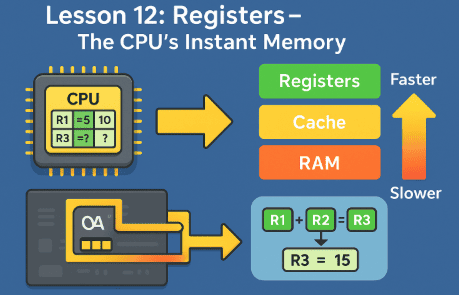
Lesson 12: We learned that registers are the fastest memory inside the CPU, but they’re tiny and can only hold a few values.
Now we ask:
👉 If registers are too small and RAM is too slow, is there a middle ground?
Yes! That middle ground is CPU cache memory.
🧠 What is Cache Memory?
Cache is a special type of ultra-fast memory that sits between the CPU and RAM.
Think of it like:
-
Registers = A few spices in your hand.
-
Cache = A spice rack next to the chef.
-
RAM = Pantry in the kitchen.
-
Hard Drive = Supermarket in town.
The spice rack doesn’t hold everything, but it keeps the most important items super close, so the chef doesn’t waste time going back and forth.
📊 Why Do We Need Cache?
Because RAM, even though it’s fast, is still thousands of times slower than the CPU.
If the CPU had to always wait for RAM, it would be idle most of the time. Cache solves this problem by:
-
Storing the most frequently used data.
-
Predicting what the CPU might need next.
-
Feeding data much faster than RAM can.
🏗️ The Three Levels of Cache
L1 Cache – Lightning Speed ⚡
-
Smallest (usually 32 KB to 128 KB per CPU core).
-
Fastest cache, located directly next to the CPU’s execution units.
-
Divided into Instruction Cache (I-Cache) and Data Cache (D-Cache).
👉 Analogy: The spices already sprinkled on the cutting board.
L2 Cache – Balance of Size and Speed ⚖️
-
Larger (usually 256 KB to several MB).
-
Slower than L1 but much bigger.
-
Acts as a backup when L1 doesn’t have the data.
👉 Analogy: The spice rack right next to the chef.
L3 Cache – Shared Powerhouse 🏢
-
Much larger (several MB to even hundreds of MB in modern CPUs).
-
Slower than L2 but shared among all CPU cores.
-
Helps multi-core processors share data without going to RAM too often.
👉 Analogy: A walk-in pantry close to the kitchen.
🔄 How Cache Works – Step by Step
Let’s say the CPU needs a number:
-
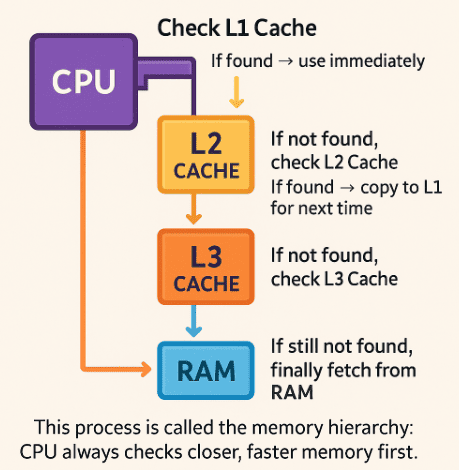
Check L1 Cache (tiny but super fast). If found → use immediately.
-
If not found, check L2 Cache. If found → copy to L1 for next time.
-
If not found, check L3 Cache.
-
If still not found, finally fetch from RAM.
This process is called the memory hierarchy: CPU always checks closer, faster memory first.
📉 Cache Miss vs Cache Hit
-
Cache Hit = Data was found in cache. CPU gets it instantly.
-
Cache Miss = Data wasn’t there. CPU must go down the chain (L1 → L2 → L3 → RAM).
A cache hit is like finding your keys on the table where you always leave them.
A cache miss is like realizing they’re still in the car outside.
🧮 Example: Gaming Performance
When you play a game, the CPU keeps frequently used values (like player position, health, and ammo count) in cache.
-
If the CPU gets a cache hit, it updates instantly.
-
If it gets a cache miss, it has to fetch from RAM, which might cause a tiny lag or stutter.
This is why larger, well-designed caches can dramatically improve performance.
🔮 The Future of Cache
Cache keeps evolving:
-
CPUs like Apple M1/M2 and AMD Ryzen 7000 use huge L3 caches to boost performance.
-
Some designs are experimenting with stacked cache (3D cache), putting even more memory directly on top of the CPU.
This makes the mini fridge bigger and closer than ever!
📝 Recap
-
Cache is fast memory between CPU and RAM.
-
L1: Tiny, fastest, per core.
-
L2: Bigger, slower, per core.
-
L3: Largest, shared, slower but still faster than RAM.
-
Cache hits make CPUs super fast; cache misses slow them down.
-
Modern CPUs are investing in larger, smarter caches for performance.