
🔄 Quick Recap
-
Lesson 1: A bus is wires that carry info (address, data, control).
-
Lesson 2: Data travels by CPU asking, RAM answering.
-
Lesson 4: CPU talks with GPU and other parts through the motherboard and PCIe highways.
Now: what if two parts try to talk on the same bus at the same time?
🧩 The Problem: Bus Contention
A bus is shared wires.
-
Only one device can use it at a time.
-
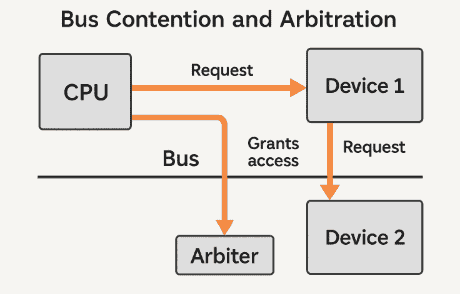
If CPU and GPU (or CPU and RAM, or two devices) try to send signals at once → the signals get mixed up → nonsense.
This is called bus contention.
Think: If two kids shout answers to the teacher at the same time, nobody understands.
🛑 The Solution: Bus Arbitration
To solve this, computers use bus arbitration — a way of deciding who gets to use the bus next.
-
Arbitration = “deciding fairly who speaks.”
-
The device that currently “owns” the bus is called the bus master.
-
Everyone else must wait their turn.
⚖️ How Arbitration Works
-
A device raises its hand (request line).
-
An arbiter (could be part of the CPU or chipset) decides who goes first.
-
The arbiter gives a grant signal to the winner.
-
The winner becomes the bus master and talks.
-
When done, the bus is freed for the next device.
This happens millions of times per second.
🎯 Different Arbitration Methods
There are several ways to decide who wins:
-
Fixed Priority
-
Some devices are always more important.
-
Example: CPU > RAM > USB.
-
Downside: Lower devices may starve (never get a turn).
-
-
Round-Robin
-
Devices take turns in order.
-
Fairer, but can waste time if a device has nothing to send.
-
-
Dynamic Priority
-
Priority can change depending on who’s been waiting longest or what’s urgent.
-
Example: If the graphics card needs data for a game frame, it gets bumped higher.
-
🏎️ Example in Action
-
You’re playing a game.
-
The CPU wants to send instructions to the GPU.
-
At the same time, the storage drive wants to save a file.
-
Both raise their hand.
-
Arbiter decides: GPU first (because screen must update fast).
-
GPU uses the bus.
-
When done, the storage drive gets its turn.
You see smooth gameplay, and your file still saves — no chaos.
🚌 Shared Buses vs Modern Point-to-Point
In older computers:
-
Many devices shared the same bus (one “road” with lots of stops).
-
This caused more contention.
In modern systems:
-
Important devices like CPU, GPU, and RAM often use point-to-point links (private highways).
-
Example: PCIe lanes go directly between CPU ↔ GPU.
-
This reduces contention, but smaller buses (like USB) still need arbitration.
📍 Real-Life Analogy
Imagine one classroom pencil sharpener:
-
10 kids want to use it.
-
If they all run at once → chaos (bus contention).
-
So the teacher makes rules (bus arbitration):
-
Kid 1 goes, then Kid 2, then Kid 3 (round robin).
-
-
This way, everyone gets a fair turn.
🌟 Recap
-
Bus contention = two or more devices try to talk at once.
-
Bus arbitration = rules that decide who gets the bus next.
-
The winner is the bus master.
-
Arbitration methods: fixed priority, round robin, dynamic priority.
-
Modern CPUs reduce contention with private point-to-point buses.