
🔄 Quick Recap from Last Lesson
In Lesson 9, we saw how the CPU and RAM talk to each other. We compared the CPU to a chef and RAM to the kitchen counter, with the hard drive acting like a supermarket. We also introduced the memory bus—the delivery trucks that carry data back and forth.
Now, in this lesson, we’re going to zoom in on that delivery system. What are these buses? How do they work? Why are there different kinds? And how do they affect the speed of your computer?
🛣️ What is a Bus in Computing?
When we say bus in computers, we don’t mean a vehicle with seats 🚌. In computing, a bus is a set of wires or pathways that carry information between different parts of a computer.
Think of it as a highway system:
-
Cars and trucks = data (1s and 0s)
-
Road signs and traffic lights = control signals
-
Exit numbers = addresses telling where each vehicle should go
Just like in a real city, without highways, everything would be stuck in chaos.
📡 The Three Major Buses in the Memory System
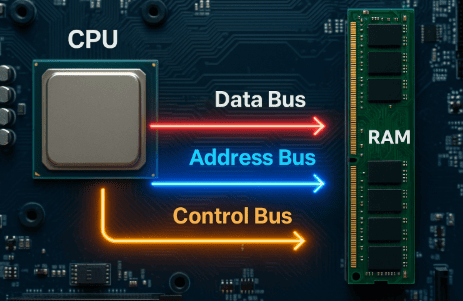
The memory bus actually has three parts, each with its own role:
-
Address Bus 🗺️
-
Like GPS coordinates.
-
Tells RAM where the CPU wants to go. Example: “Give me the value stored in location 2050.”
-
One-way: CPU → RAM.
-
-
Data Bus 📦
-
Like delivery trucks carrying packages.
-
Transfers the actual data (1s and 0s).
-
Two-way: CPU ↔ RAM (both sending and receiving).
-
-
Control Bus 🚦
-
Like traffic lights, honks, and signals.
-
Tells whether the CPU is reading from or writing into RAM.
-
Keeps order so that data doesn’t crash into each other.
-
Together, these buses form the communication lifeline between CPU and RAM.
⚡ Width of the Bus – Why “Lanes” Matter
A real highway can be one-lane or multi-lane. The more lanes, the more cars can travel at the same time.
Similarly, in computers:
-
A 32-bit bus can move 32 bits (4 bytes) at once.
-
A 64-bit bus can move 64 bits (8 bytes) at once.
This is why 64-bit computers can handle more data per cycle, making them faster and able to support more RAM.
👉 Think of it as a single-lane road (32-bit) vs. a six-lane highway (64-bit).
🕑 Bus Speed – The Rhythm of Traffic
Another important factor is how fast cars move on the highway.
This depends on the clock speed of the bus.
-
Just like cars move with a rhythm (green light, red light), buses move data with ticks of a clock signal.
-
Each tick is called a clock cycle.
For example:
-
If a memory bus runs at 1600 MHz, it can make 1.6 billion cycles per second.
-
But if the bus is double data rate (DDR), it can transfer data twice per cycle—making it effectively twice as fast.
📊 Example: A Real Data Transfer
Let’s say your computer has DDR4 RAM running at 3200 MHz with a 64-bit bus.
-
Each transfer moves 64 bits = 8 bytes.
-
Since DDR transfers twice per cycle, it’s 3200 × 2 = 6400 million transfers per second.
-
6400 million × 8 bytes = 51,200 MB/s of bandwidth (about 51 gigabytes per second).
That means your CPU can fetch or store 51 billion characters every second through the bus. Pretty amazing, right?
⚖️ Latency vs Bandwidth
Two important words:
-
Bandwidth = How much data can move per second (like how many cars per minute can cross a bridge).
-
Latency = How long it takes for one piece of data to arrive (like the time for the first car to reach the destination).
A bus can have high bandwidth but bad latency (many cars moving, but the first one takes a while). Or it can have high latency but low bandwidth (the first car arrives quickly, but only a few can follow).
Both matter in memory performance.
🛠️ Evolution of the Memory Bus
The bus hasn’t stayed the same over the years. It has evolved:
-
Front-Side Bus (FSB): Old systems used this as the main road between CPU and RAM.
-
Dual-Channel Memory: Two highways side by side, doubling data transfer.
-
Quad-Channel and Beyond: Four or more parallel highways, used in servers.
-
Integrated Memory Controller: In modern CPUs (like Intel Core and AMD Ryzen), the memory controller sits inside the CPU, reducing delays.
🚀 Modern Developments: Point-to-Point Links
New systems don’t use a single shared bus anymore. Instead, they use point-to-point connections like:
-
Intel’s QuickPath Interconnect (QPI)
-
AMD’s Infinity Fabric
These are like private highways between the CPU and RAM banks, reducing traffic jams.
🔮 The Future: Optical and 3D Memory Buses
Researchers are working on:
-
Optical interconnects (using light instead of electricity) → faster, less heat.
-
3D-stacked memory buses (like High Bandwidth Memory, HBM) → extremely wide buses directly on top of CPUs.
This means in the future, memory buses might look less like highways and more like super-fast wormholes.
📝 Recap
In this lesson, we learned:
-
A bus is a set of pathways that carry data between CPU and RAM.
-
The bus has three main parts: address, data, and control.
-
Width (32-bit, 64-bit) and speed (clock cycles, DDR) determine performance.
-
Bandwidth and latency are two critical measures.
-
The memory bus has evolved from FSB to modern point-to-point links.
-
The future may bring optical and 3D buses for even faster performance.