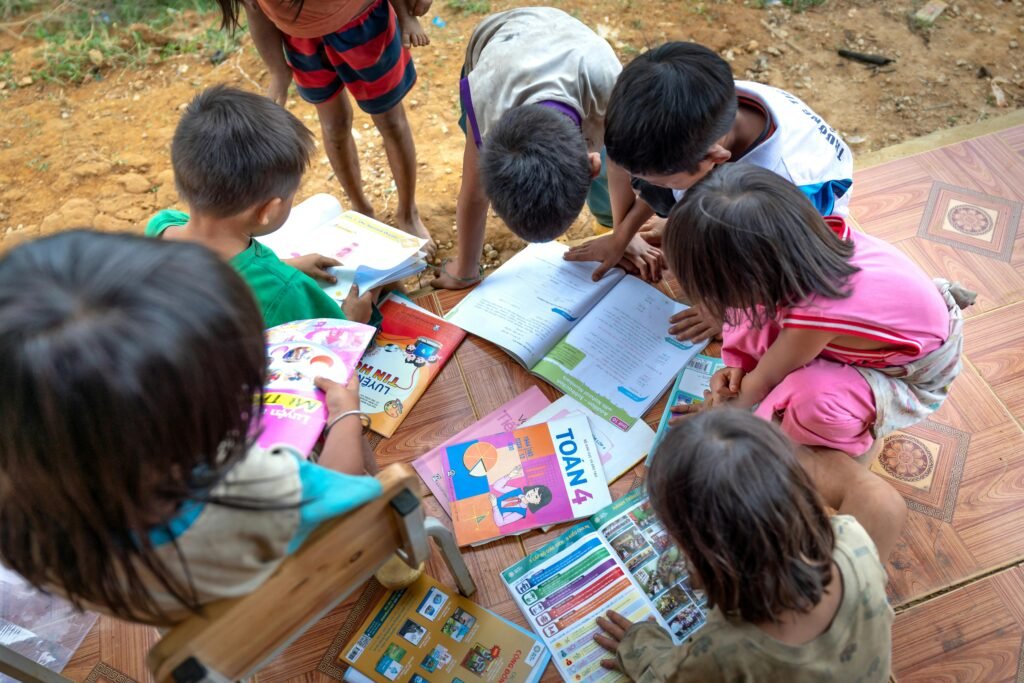
EdTech can feel like magic when it works. A child taps a screen, meets a great teacher, and learns fast. But for many families, the problem is not the child’s interest or the parent’s effort. The problem is simple: the internet drops, the power goes out, the device is shared, and learning stops.
1) Globally, about two-thirds of urban residents use the internet, while only about one-third to two-fifths of rural residents do.
What this looks like in real life
In many cities, the internet is treated like water. It is just there. A child can join a class, watch a video, or submit homework without much planning. In many rural places, the internet feels like a visitor. It comes, it goes, and it may not show up when you need it most.
This gap is not about effort. It is about access. When a child cannot count on the internet, learning becomes stop-and-start. That hurts confidence. It also makes parents feel stuck, even when they care deeply.
What to do right now
Start by finding your “best signal times.” Most rural networks get busy at certain hours. For many families, early morning works better than evening. Run a simple test for three days. Try a short video call at two different times, then write down which time feels smoother. Use the best time for live learning.

Next, build a two-track study routine. Track one uses live classes or videos when the internet is good. Track two is fully offline. Track two can be a notebook routine with small daily goals, like one math idea, one reading passage, and one simple science question.
The key is that learning must continue even when the internet fails. This protects your child’s habit and mood.
If your child uses Debsie, treat live classes as the “coaching moment” and use offline practice as the “muscle-building moment.” When you do get internet, download learning materials right away so you are not forced to stream again later.
How to measure progress fairly
Do not compare your child’s daily screen time with a city child. Compare learning outcomes. Ask, “Can my child explain what they learned today in simple words?” If the answer is yes, you are winning, even with fewer online hours.
2) In many low- and middle-income countries, rural households are roughly 2× more likely than urban households to have no internet access at all.
Why this matters more than it seems
No internet is not the same as “slow internet.” It is a full barrier. It means a child may never see a good teacher online, never access practice apps, and never take part in digital challenges that build skill fast. Over time, this can create a learning gap that feels unfair and heavy. The good news is that many EdTech skills can still be built with smart planning, even before full internet arrives.
A simple plan for families without home internet
Your goal is to create a weekly learning cycle. Choose one or two days when you can reach stable internet, even if it is outside your home. On those days, download what you need for the whole week.
Save short videos, practice sheets, and a clear study plan. Then return home and study offline daily in small chunks. This is better than trying to learn only on the days you have internet, because children need steady practice.
If you have one phone in the family, protect it as a learning tool. Keep storage space free for downloads. Turn off auto-updates that waste data. When you do have access, use it with purpose. Do not scroll first. Download first.
What schools and local groups can do
If you are a school leader or community helper, set up a local “download point.” Even one place with stable internet can support many families. Parents can bring devices, save learning packs, and go home to study offline. This one step can unlock learning for hundreds of children without waiting for big changes.
3) Fixed broadband at home is rare in rural areas of many developing regions—often under 10–15% of rural households, compared with 20–40%+ in cities.
What fixed broadband changes for a child
Fixed broadband is not just “faster internet.” It is steadier internet. It supports long video lessons, live classes with fewer drops, and quick downloads. When rural homes do not have it, families rely on mobile data, which can be costly and unstable. That makes many parents avoid video learning, even when it could help their child a lot.
How to learn well without fixed broadband
If you rely on mobile data, your best move is to reduce streaming and increase saving. Streaming repeats the same cost again and again. Saving content once and reusing it is smarter. When the signal is good, download short lessons and keep them.
Choose learning sessions that are shorter but consistent. A child who studies for 25 minutes daily often grows faster than a child who studies for two hours only once a week.

Set your device to use lower video quality when needed. The goal is not perfect picture quality. The goal is clear teaching and steady progress. Encourage your child to take notes while watching. Notes turn a short video into long learning because the child can review the notebook even when the internet is off.
A practical home setup that helps
Create a fixed study corner, even if it is small. Keep the charger there. Keep the notebook there. Keep one simple rule: learning happens at the same time each day, no matter what the internet does. If a live class fails, the child switches to offline practice right away. This avoids frustration and keeps the habit strong.
4) Mobile internet is the main connection for rural learners: in many countries, 70–90% of rural “internet households” rely mostly on mobile data, not home broadband.
What this means for learning at home
When a family depends on mobile data, learning becomes tied to a phone signal and a data balance. This creates three common problems. First, a child may avoid practice because they fear “using up data.” Second, live classes can feel stressful because the connection may change minute to minute. Third, one phone often serves many needs, so learning time gets pushed aside.
Mobile-first learning can still work well, but only if the plan respects the limits. The goal is not to copy an urban routine. The goal is to build a routine that fits mobile life.
Practical steps that work on mobile
Treat your phone like a learning device, not just a communication device. Keep enough free storage so you can save lessons when the signal is strong. Make it a habit to download learning material during low-cost or strong-signal times, then study offline later.
If your child attends live sessions, close all other apps before class so the phone is not fighting for memory and bandwidth.
Keep study sessions short and focused. A child can learn a lot in 20–30 minutes if the task is clear. Ask your child to explain the lesson back to you in simple words. This “teach-back” method makes learning stick, even if the online time was short.
If possible, reserve one data pack mainly for education. When children know their learning time is protected, they show up with a calmer mind. If you are exploring Debsie, tell the support team you are mobile-first and ask for a plan that prioritizes steady progress with limited streaming.
5) Average download speeds in rural areas are commonly 30–60% slower than in nearby urban areas (for example, 10–25 Mbps rural vs 25–60+ Mbps urban, depending on country).
Why speed matters even when you “have internet”
Many parents hear “Mbps” and think it is only for movies. In learning, speed affects basic things like joining a class on time, hearing the teacher clearly, and submitting homework without delays. Slower speeds also create hidden time loss. A child may spend ten minutes waiting for a file, then lose focus before learning even begins.
The key is to design learning so speed becomes less important. You do this by reducing real-time dependence and increasing preparation.
How to learn smoothly on slower speeds
Start by switching from long videos to short lessons. Shorter lessons load faster, fail less often, and are easier to repeat. If your child must use video, use standard quality rather than high quality. Clear sound is more important than sharp picture.

Plan your week in advance. On a day when the signal is better, download what your child will need for several days. Then your child can learn without waiting for loading screens. If your child has live classes, join five minutes early to buffer the connection.
Keep the device close to a window or a spot where signal is strongest. Small location changes inside a home can make a real difference.
Most importantly, add a “no-wait rule.” If something does not load within one minute, your child switches to an offline task right away, like practice questions, reading, or a written summary. This protects focus and stops the habit of frustration.
6) Rural users are more likely to be on 2G/3G networks: in many regions, 10–25% of rural coverage still falls back to older networks, versus single-digit percentages in cities.
What older networks do to EdTech
Older networks can be enough for messages and simple web pages, but they struggle with live video, interactive tools, and fast downloads. Children on 2G or 3G often experience blurry video, delayed audio, and sudden drops. Over time, this can make a child feel that online learning is “not for them,” even though the real issue is the network.
The solution is to match the learning method to the network, not the other way around.
Actionable ways to succeed on 2G/3G
First, reduce live dependence. If live classes are available, use them when you can, but do not make them the only path. Use recorded lessons that can be downloaded in advance from a stronger spot. Even better, use lightweight learning resources that load easily, like simple quizzes, text-based explanations, and audio lessons.
Second, build “proof of learning” without heavy internet. Ask your child to write answers, draw diagrams, or record a short voice note explaining what they learned. This keeps learning deep, even without video.
Third, improve your chances with small technical habits. Keep the phone updated when you have strong internet, but turn off auto-updates at home. Use one browser tab only during study time. If possible, test different spots near your home where the signal is stronger, and make that the study spot.
7) In Sub-Saharan Africa, urban mobile broadband (3G/4G) coverage is often 20–30 percentage points higher than rural coverage.
What this gap feels like for families
Coverage is not just a map issue. It becomes a daily learning issue. In many cities, 3G or 4G is common, so a child can join classes with fewer breaks. In many rural areas, the network may switch between weak 3G and no data at all.
So even when parents buy data, the child may still not get a stable class. This can make families feel cheated, and children can start to think learning is “too hard” when it is really the infrastructure.
What you can do with the reality you have
Start by designing learning that does not require the network to be perfect every day. A strong approach is to treat live classes as “bonus learning” and keep the core learning offline-ready.

Choose one or two days each week to access stronger coverage if possible, even if that means going to a relative’s house, a town spot, or a school connection. Use those moments to download lessons, save worksheets, and set up the week.
If your child attends live sessions, reduce bandwidth during class. Keep video off when allowed and focus on audio. Many children learn well by listening and writing notes. Also, always keep a backup task ready: a short set of questions, a reading passage, or a coding logic puzzle on paper.
When the connection drops, the child switches instantly, so the learning hour does not collapse.
Community-level moves
If you are part of a local school or group, create a shared “learning hotspot time” where families can come, download packs, and leave. This simple routine can reduce frustration and raise learning consistency across many homes.
8) In parts of South Asia, rural internet use can be 20–35 percentage points lower than urban internet use in the same country.
Why the “same country” part matters
This gap happens under the same laws, same curriculum, and same exams. So the difference is not about ability. It is about access. When rural internet use is much lower, it affects how early children meet digital tools, how often they practice, and how confident they feel online. Many rural learners can feel behind even before they start, simply because they have fewer chances.
A parent plan that builds digital confidence
Make digital learning normal in small steps. Do not wait for perfect internet or a perfect device. Start with short, steady habits. Even 15 minutes of focused learning, four to five days a week, builds skill and confidence.
If the internet is limited, use it for the highest-value moments. Those moments are teacher guidance, feedback, and correcting mistakes. Everything else can be offline practice. A simple routine is: connect, learn one new idea, save the resource, then practice offline.
Over time, your child builds a “learning library” on the device and a “learning memory” in a notebook.
What to ask from any EdTech program
Ask for low-data options, simple homework that can be done on paper, and clear weekly goals. If you are trying Debsie, tell the team your internet is limited and ask for a study plan that works with short online windows. The right plan will protect your child’s progress and reduce stress at home.
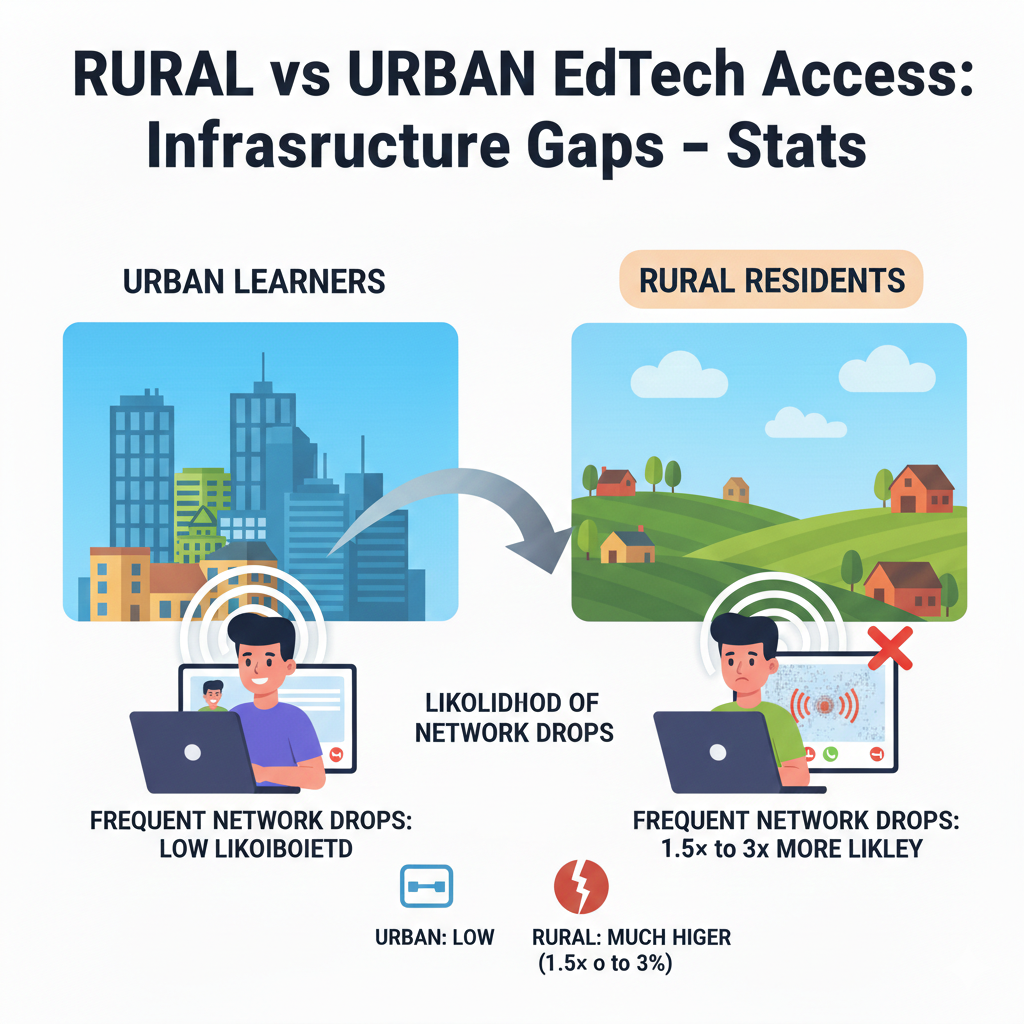
9) Rural learners are commonly 1.5× to 3× more likely to report frequent network drops during video classes than urban learners.
The hidden cost of drops
Network drops do not only waste time. They break attention. A child who loses the class three times in one session often stops trying to follow fully. They may feel embarrassed, especially if they must keep rejoining. Over weeks, this can reduce motivation and make the child avoid live learning altogether.
How to protect learning during live sessions
First, set expectations kindly. Tell your child that drops are normal and not their fault. This lowers anxiety. Next, use a “rejoin system.” Keep the class link saved and ready, so rejoining takes seconds, not minutes. Close background apps before class.
Put the phone on “Do Not Disturb” to prevent calls and notifications from breaking the connection.
If the platform allows it, turn off the child’s camera. This reduces data use and often improves audio stability, which is what matters most for learning. Encourage the child to keep a notebook open and write key points. Even if the class drops, the child can keep working on the notes and questions.
Build a backup that feels smooth
Always have a clear fallback task for that same topic. If the drop lasts more than one minute, the child switches to the fallback task. When the class returns, the child comes back without feeling lost. This keeps the learning hour productive and protects the child’s confidence.
10) A typical live video class can use 0.7–1.5 GB per hour (standard definition), which can consume a week’s worth of affordable data for many rural families on low data packs.
Why this stat changes how you plan learning
Many families try live video first because it feels like “real school.” The problem is that live video is one of the most expensive ways to learn on mobile data. When one class can drain a large part of a data plan, parents face an unfair choice: learning or staying connected for work and family needs.
Children also sense this pressure. They may rush, avoid asking questions, or skip class because they feel guilty about data use.
How to cut data use without cutting learning
Start by using live video only for the highest-value parts of learning. That usually means guidance from a teacher, doubt clearing, and feedback on mistakes. For practice, switch to offline or low-data tasks. If your child needs video lessons, choose short recordings instead of long live sessions, because recordings can be downloaded once and reused.
If a live class is needed, reduce the data load. Keep camera off when possible. Use standard quality rather than high quality. Keep only one device connected. Also, avoid using the internet for other tasks during class. Even one extra phone streaming nearby can slow the network and increase data waste.
Build a “download day” habit
Pick one day each week when the connection is strongest or the data offer is best. On that day, download lessons, worksheets, and weekly plans. Then study offline most days. This single habit can cut data spending while keeping learning steady.
If you use Debsie, ask for a schedule that blends short live support with offline-friendly practice, so your child gets the teacher’s help without the heavy data bill.
11) In many low-income settings, the cost of 1 GB of mobile data takes up 2–5% (or more) of a rural monthly income, versus often under 2% in cities.
What this means for parents
When data costs take a big share of income, every gigabyte feels risky. A parent may delay buying data, stretch the pack, or stop online learning during tight weeks. This is not lack of care. It is basic household math. The result is learning that starts strong, then breaks, then restarts.
Children do not just lose lessons. They lose rhythm.
Make learning predictable, not expensive
The best fix is to plan learning around a set data budget. Decide what you can afford each month for learning data. Then design the learning routine to fit that budget instead of hoping it will somehow work out.

Use the data for three things only: joining key classes, downloading core materials, and sending work for feedback. Avoid data leaks. Turn off auto-play in social apps. Turn off automatic app updates. Turn off cloud backup on mobile data. These small settings can save large amounts over a month.
Build an “offline-first” skill habit
Teach your child to learn with paper and thinking, not only with streaming. Encourage them to write steps, draw diagrams, and solve problems by hand. Then use online time to check answers and get feedback.
This makes learning deeper and cheaper at the same time. If you need help creating a plan that fits your budget, Debsie’s trial class is a good moment to ask for a low-data routine that still builds strong skills.
12) Rural households are often 10–25 percentage points less likely than urban households to have a computer (desktop/laptop) at home.
Why a computer still matters
Phones are powerful, but computers make some learning easier. Typing code, writing long answers, using spreadsheets, and building projects often feel smoother on a laptop.
When rural homes do not have computers, children may think coding or advanced digital work is “not for them.” That belief can limit goals, even when the child is talented.
How to learn well without a computer
First, do not wait for a laptop to start. Many core skills can begin on a phone: logic, math thinking, problem solving, and even beginner coding concepts. The key is to focus on fundamentals. A child who learns patterns, sequences, and simple algorithms will transition to a computer faster later.
Second, create “computer moments” when possible. If there is a school lab, a community center, or a relative with a laptop, schedule one session every one to two weeks. Use that time for tasks that are hard on a phone, like typing practice, project work, or coding in a bigger editor.
Make the phone experience stronger
Use a low-cost keyboard if available, or practice typing in short bursts. Keep files organized in folders so the phone does not become messy and slow. Most importantly, keep the child building confidence. Tell them clearly: “A laptop helps, but your brain is the real tool.” With the right routine, a child can become strong in STEM and coding even before a computer arrives.
13) In many developing regions, smartphone ownership is still lower in rural areas by 10–20 percentage points, even when mobile coverage exists.
Why coverage does not equal access
A signal in the air does not help if there is no device in hand. This gap often surprises people. They assume that once towers exist, learning becomes easy.
But many rural families are still saving for phones, sharing one phone across the home, or using older devices that cannot run modern learning apps well. For children, this can mean fewer chances to practice, fewer chances to explore, and less confidence using digital tools.
What families can do without buying a new phone
If your child has limited access to a smartphone, treat learning time like a protected appointment. Choose a fixed time each day when the phone is available for study. Keep that time short but consistent. Even 20 minutes daily can build strong progress when the child knows the time is guaranteed.

Also, simplify the phone. Delete unused apps that slow it down. Clear storage so lessons can be saved. Use a browser-based learning option when apps are too heavy. Keep learning materials light: short lessons, simple quizzes, and offline practice in a notebook.
What to do if the phone is too old
Older phones struggle with video and large apps. In that case, focus on low-data learning and offline tasks. Use audio lessons when possible, because audio uses less data and plays better on weaker devices. If you are joining live classes, keep video off and rely on audio plus notes.
If you are exploring Debsie, ask for a plan that works on older phones, with short lesson clips and strong offline practice. The best programs do not punish families for the device they have.
14) Rural students are more likely to share devices: it’s common for 2–5 people to share one phone in a rural household, compared with 1–3 in urban households.
The real issue is time, not only technology
When one phone is shared, learning becomes a scheduling problem. A child may lose study time because a parent needs the phone for work calls, payments, or travel. Siblings may compete for the same device. This can cause conflict at home and can quietly reduce learning hours week after week.
Create a simple, fair device schedule
A strong fix is a home “device timetable.” Keep it simple and visible. Assign time blocks for each person, with the child’s learning placed at a stable time. If the phone must stay with a working parent, move the child’s online time to early morning or late evening and keep offline practice for the rest of the day.
Teach the child to prepare before their device time begins. They should know exactly what lesson they will watch, what task they will do, and what they will submit. This avoids wasting precious minutes deciding what to do.
Make shared-device learning smoother
Keep each child’s work in a separate notebook, and keep digital files in separate folders. Log out of social apps during learning time so distractions do not steal the device window. If the child’s class time gets interrupted, the child should switch to offline practice instantly, so the learning habit stays steady even when the device is taken back.
15) In many countries, 20–40% of rural students depend on a parent’s phone for learning, making study time limited to evenings or weekends.
Why this creates a learning trap
When learning depends on a parent’s phone, the child’s study time often becomes the “leftover time.” Evenings may be noisy. Parents may be tired. Weekends may be filled with family work. This can lead to rushed learning and missed practice, even when the child wants to learn.
Build a routine that fits parent-phone reality
First, accept that your child may not get long daily online hours. That is okay. Focus on steady progress. Use weekday evenings for short, clear tasks. For example, one short lesson, then one small practice set. Keep it predictable so the child does not waste time restarting each day.
Use weekends for heavier tasks. This is when the child can attend a longer session, review the week’s work, and prepare for the next week by downloading needed materials. Treat weekend learning like a reset button.

Protect the child’s focus in the evening
Evening learning needs calm. Choose one quiet corner. Keep a notebook, pencil, and charger ready. Before the phone arrives, the child should already be seated with the task written down. When the phone comes, there is no arguing, no searching, no delay.
If you try Debsie, tell the team your child uses a parent’s phone and ask for evening-friendly micro-lessons plus weekend consolidation. This type of plan often leads to better results than trying to force daily long live classes.
16) Rural schools are often 2× to 4× less likely than urban schools to have a reliable internet connection on campus.
Why school internet matters even for home learning
When a school has reliable internet, it becomes a learning hub. Teachers can show digital lessons, download resources, and guide students in using tools. When rural schools lack reliable internet, children lose that shared support.
They also lose the chance to practice digital skills in a structured place. This makes the home carry all the load, even when the home has the same internet limits.
What school leaders can do with limited budgets
If you run a rural school, the goal is not “perfect internet everywhere.” The goal is “one reliable point that works consistently.” Start by choosing one room as a digital learning room. It can be a library or a small lab corner.
Put the best available connection there, even if it is a basic router and a controlled schedule. A working learning corner is better than weak internet spread across many rooms.
Next, plan internet use for high impact. Use school internet to download lessons, teacher guides, and practice packs that can be used offline in classrooms. Teachers can carry content on a USB drive or local storage. This turns internet into a tool for preparation, not a tool that must stay live every minute.
What parents can ask from schools
Parents can request a weekly “download support time” where students can bring devices to get learning packs. Even a 30-minute slot per class can help many families. If your child learns with Debsie, ask the school if they can support downloads of lessons or worksheets. When school and home work together, rural students can get a much smoother learning journey.
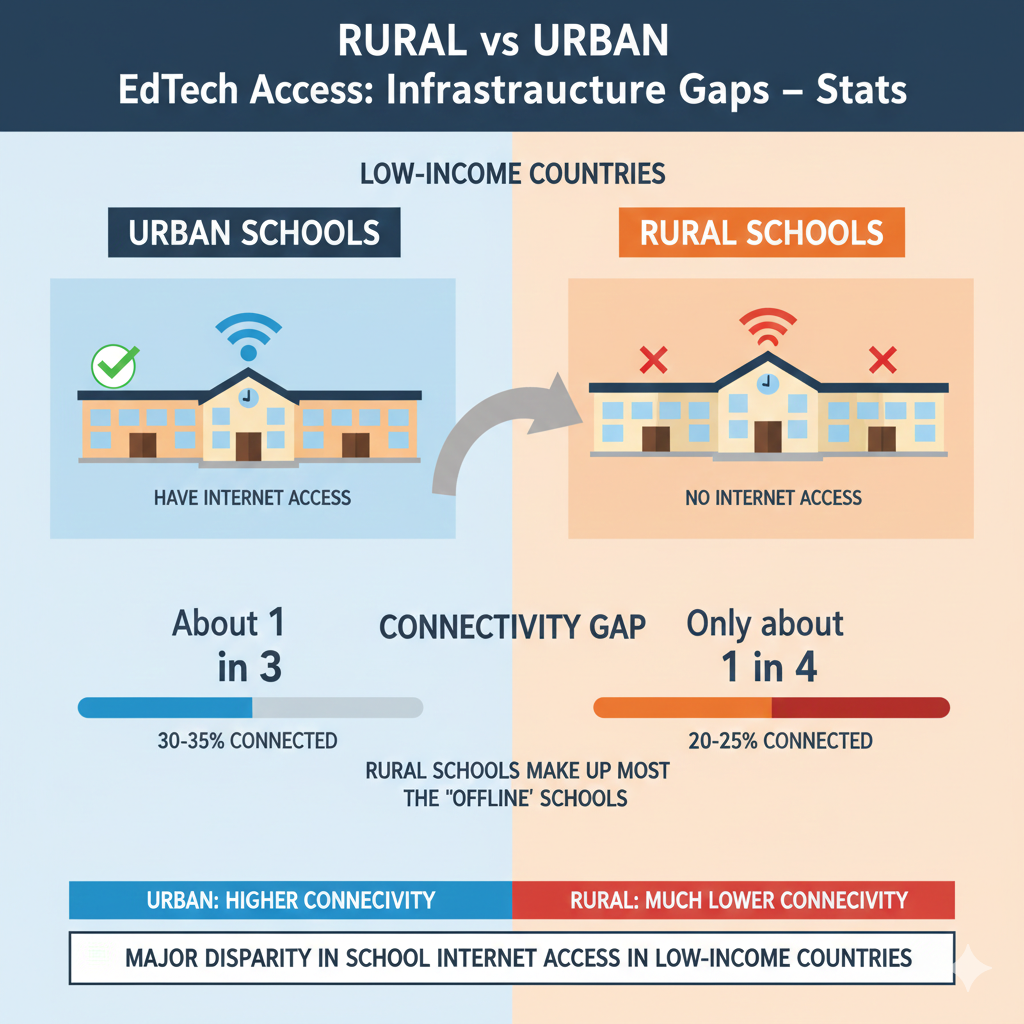
17) In low-income countries, only about 1 in 4 to 1 in 3 schools have any internet access, and rural schools make up most of the “offline” schools.
The real problem behind this stat
When most rural schools are offline, EdTech becomes uneven by design. Some children get digital practice early. Others meet it late. This affects exam readiness, job skills, and confidence. It also affects teachers. Teachers without internet access cannot easily update content, learn new methods, or join training communities.
How to build “internet benefits” without full internet
If your school is offline, do not wait for a big upgrade to start. Use a “content delivery” approach. Identify a small set of weekly learning resources that match your curriculum. Get them downloaded in town or through a partner school once a week.
Then use them offline in class. This can include short videos, teacher notes, quizzes, and simple coding activities that can run without internet.
You can also create offline learning clubs. A math club can use printed puzzles. A science club can do hands-on experiments with local materials. A coding club can practice logic and sequencing with paper-based challenges and simple offline apps when available.
What communities can do together
Local groups, NGOs, and parent groups can sponsor one internet point in the community, even if it is limited. The key is structure: a schedule, a content plan, and a way to share materials fairly. This turns one connection into learning for many children, instead of access for only a few.
18) Even where schools have internet, usable classroom connectivity is much lower: commonly only 30–50% of “connected schools” can actually stream video smoothly in multiple classrooms.
Why “connected” does not always mean “working”
A school may be listed as connected, but the real experience can still fail. The internet may work only in the principal’s office. It may slow down when many classes try to use it. It may fail when weather changes. Teachers then stop planning digital lessons because it feels unreliable.
Students lose trust too, because a lesson that fails mid-way feels confusing and wasted.
A smarter way to use weak school internet
Instead of trying to stream in every classroom, use the internet for preparation and rotation. Choose one room as the “stream room.” Rotate classes through it on a schedule for short, focused digital sessions. In other rooms, use offline activities that match the same topic. This keeps learning aligned and avoids the stress of broken streams.
Teachers can also pre-download videos and play them offline in class. This removes buffering and saves time. If devices are limited, one teacher device with a speaker can still deliver a good mini-lesson, followed by group discussion and written practice.
How to make this work day after day
The secret is routine. Pick a weekly plan: one digital concept lesson, one practice day, one review day. Keep it steady. When students know what to expect, they stay engaged. If your school uses Debsie resources, ask for downloadable content and clear weekly learning goals.
That makes your limited school internet feel powerful, not weak.
19) Rural schools are frequently 10–30 percentage points less likely than urban schools to have electricity than urban schools in the same country.
Why electricity is the first EdTech problem
Before internet, before devices, before apps, there is electricity. No power means no charging, no projector, no computer lab, and often no light for late study. When rural schools lack electricity more often than urban schools, EdTech becomes a far-away idea instead of a daily tool.
This also affects teacher morale. A teacher may want to use digital content, but cannot rely on power.
What schools can do even with unstable power
If you are a school leader, start by mapping your power reality. Which rooms get power most often? Which hours are stable? Then schedule digital activities only inside those safe windows. This sounds small, but it prevents repeated failure, and repeated failure kills adoption.

Next, prioritize low-power tools. Printed worksheets, hands-on STEM activities, and discussion-based lessons can carry learning when power is down. When power is available, use it for the most valuable actions: charging devices, downloading content, and preparing lessons that can be used offline later.
If your community can support it, consider shared power solutions like a small solar charging station for the school. Even one reliable charging point can change everything because it keeps devices alive.
What parents can do in a low-power area
At home, keep a simple charging routine. Charge whenever power is available, even if the device is not empty. Keep a power bank if possible. And always keep offline learning ready, so your child’s learning does not stop when lights go out.
20) In some regions, 5–15% of rural households still lack reliable electricity, which directly limits device charging and nighttime study.
How unreliable power breaks study habits
A child needs rhythm. When power is unreliable, study time becomes uncertain. Many children end up studying only when power happens to be on. This leads to uneven learning and weak confidence. Parents may also struggle to plan because evenings may be dark or focused on basic household needs.
Make learning independent from power as much as possible
The simplest strategy is to shift key learning to daylight hours. If your child comes home from school, try to complete the most important work before sunset. Use evenings for light tasks that do not need a screen, like reading, writing answers, or revising notes.
Create a “battery-first” habit. When power appears, charge the learning device first, not last. Turn down screen brightness during study. Close extra apps so the battery lasts longer. Download learning material when charged and connected, so the child can use it later without needing internet or heavy processing.
Keep a strong offline routine
If the power fails, the child should still have a clear learning task. Keep a notebook plan with daily steps. Even without electricity, a child can do math practice, write a science explanation, or plan a small coding logic solution on paper. This keeps progress alive and reduces stress.
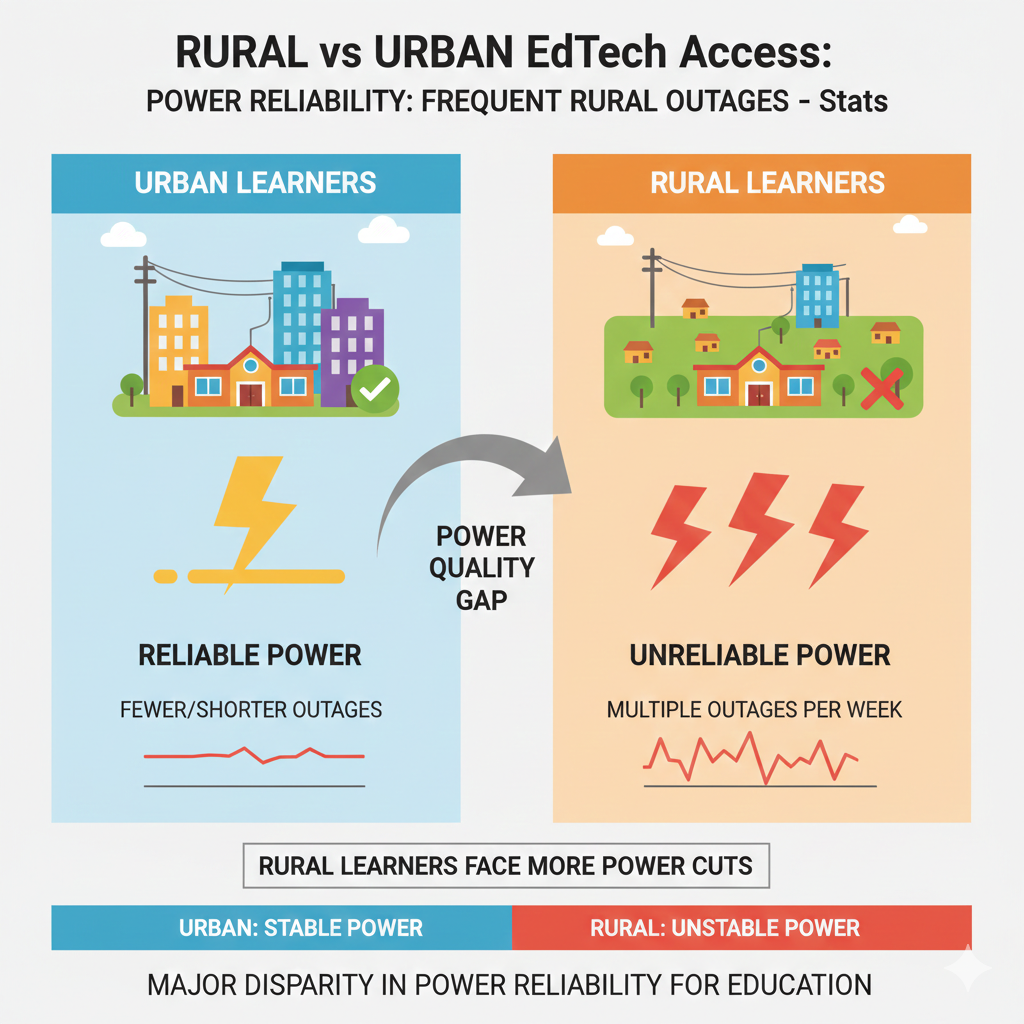
21) Power quality is a major issue: rural learners in many areas face multiple outages per week, while urban learners often see fewer or shorter outages.
The learning damage is bigger than the outage
An outage is not only lost minutes. It is broken focus. A child who is mid-lesson and loses power may not return to the same energy level. Over time, repeated outages teach a child to expect failure, which is a quiet motivation killer. Parents may also start avoiding online learning because it feels unreliable.
Build an “outage-proof” learning system
Start with a clear rule: never depend on a single method. Every learning topic should have two ways to learn. One is online. One is offline. If the outage hits, the child switches to the offline path within one minute. This keeps the study session intact.
Use small backups that do not feel like punishment. Keep a set of short practice questions matched to the current topic. Keep one reading passage tied to science or history. Keep one thinking puzzle for logic. These are not random tasks. They should match what the child is learning now, so the child feels continuity, not disruption.
Use power-on moments wisely
When power returns, do not rush into entertainment. First charge devices. Then download needed lessons. Then, if time remains, join a live session or watch a short clip. This order reduces panic and keeps learning stable across the week.
22) Rural families often pay more per unit of connectivity: the effective cost per Mbps can be 1.5× to 3× higher in rural areas than in cities.
Why this is a hidden unfairness
Many parents notice that data is “expensive,” but they may not realize they are paying more for less. If the same amount of money buys slower speed and weaker stability, then rural families are charged twice: once in cost and again in lost learning time.
This can make parents feel that online learning is only for city children. That belief is understandable, but it does not have to be the final story.
How to get more learning from the same spend
Treat connectivity like a limited fuel. Use it for high-value moments only. High value means teacher feedback, correcting mistakes, and downloading materials you can reuse many times. Low value is endless streaming, repeated scrolling, and apps that refresh constantly.
Make your learning content reusable. A downloaded worksheet can be used twice. A saved lesson can be watched again. Notes can be reviewed without any internet. This is how you stretch each rupee or shilling or dollar.
Also, avoid “wasted bandwidth.” Turn off auto-play in video apps. Turn off auto-download in messaging apps. Turn off background updates on mobile data. These small settings often save enough data to cover several learning sessions.
Design the week like a smart budget
Choose two or three short online learning windows each week, then build offline practice around them. This creates steady progress without constant spending. If you use Debsie, ask for a plan that mixes live support with offline practice. A well-structured learning plan can reduce data costs while still giving your child strong teacher guidance and clear goals.
23) In many countries, the rural–urban gap in “home learning readiness” (device + internet + quiet space) is typically 15–30 percentage points.
Why quiet space is part of EdTech access
People focus on devices and internet, but quiet space is a real part of learning readiness. If a child shares a room with siblings, has noise from work at home, or has no stable study corner, even good internet will not produce good learning. Cities often have more study spaces, while many rural homes use shared spaces for many purposes.
Build a study space even when space is small
You do not need a separate room. You need a routine and a boundary. Pick one corner. Keep learning tools there: notebook, pencil, charger, and the child’s learning plan. Agree on a simple house rule: during the learning time, others keep noise low and interruptions minimal.

Even if the home is busy, ten protected minutes are better than an hour of broken attention.
If quiet is impossible, use headphones if available. If not, choose learning tasks that survive noise, like written practice and reading, and save live audio lessons for calmer times.
Make readiness a weekly goal
Once a week, improve one thing: clear storage on the phone, charge the device, prepare the week’s tasks, and tidy the study corner. Readiness is not a one-time setup. It is a habit. When readiness improves, learning becomes smoother even without upgrades in internet.
24) Teacher readiness is also uneven: rural teachers are often 10–20 percentage points less likely to have had formal ICT/EdTech training than urban teachers.
Why trained teachers change everything
EdTech is not only about tools. It is about how teachers use them. A teacher trained in digital methods knows how to keep lessons simple, how to use low-data options, and how to support students who struggle with access. Without training, teachers may avoid digital tools or use them in ways that frustrate students.
What teachers can do without formal training
If you are a teacher, start small and practical. Choose one digital skill to practice each week. For example, learn how to download and share one lesson file for offline use. Next week, learn how to collect student work using a simple method, like photos of notebooks. The goal is steady improvement, not perfect mastery.
Also, design lessons that do not depend on live streaming. Use short recorded explanations, printed practice, and discussion. When students have access issues, they can still learn.
What parents and schools can encourage
Parents can support teachers by sharing what works at home. Schools can create peer training, where one teacher who is confident helps others. Even a monthly sharing session can raise the whole school’s skill level.
If your child uses Debsie, share feedback with the program and your teacher so the learning plan stays realistic for rural conditions.
25) In many settings, rural schools have fewer devices: it’s common to see 1 computer per 40–100 students in rural schools versus 1 per 10–30 in urban schools.
Why device ratios shape student confidence
When many students share one computer, most children get only a few minutes of hands-on time. They may watch someone else click, but they do not build the “I can do it” feeling that comes from using the device themselves.
Over time, this creates a quiet gap. Urban students get repeated practice. Rural students may only get rare turns. The result is not lower ability. It is lower exposure.
How schools can stretch limited devices
If you are a school leader, the best approach is rotation with clear roles. When a small group shares one device, assign roles that change every session. One student controls the keyboard. One reads the steps. One checks the result.
One writes notes. Next session, rotate roles. This way every child builds both tech skill and thinking skill.
Also, limit device time to tasks that truly need a device. Typing practice, coding editors, and digital simulations are high value. Reading long text on a shared computer is low value because it blocks others. Use paper for reading and use computers for active tasks.
What parents can do when school devices are limited
At home, build the missing practice through simple activities. Even without a computer, a child can practice logic, sequencing, and problem solving on paper. Encourage your child to explain steps out loud.
This builds coding thinking before they touch a keyboard. If your child uses Debsie, ask for device-light practice tasks that still build deep skills, so school device shortages do not slow progress.
26) Rural schools are more likely to lack basic hardware support: over half may have no dedicated IT support, compared with a much smaller share in urban schools.
Why “support” is not a luxury
A computer that breaks and stays broken is worse than no computer at all. It creates frustration and wasted money. Without IT support, small issues like a forgotten password, a router problem, or a software update can stop learning for weeks. Teachers then avoid technology because it feels fragile.
How schools can build simple support systems
You do not always need a full-time IT person. You need a basic system. Start with one “tech champion” teacher who gets extra time and training to handle simple tasks. Keep a printed checklist for common problems: device not charging, no internet, audio not working, login issues. Simple checklists reduce panic and speed up fixes.
Create a maintenance routine. Once a month, check devices, update software when possible, and clean storage. Keep a small logbook of problems and fixes. This builds knowledge inside the school over time.
What families can do to reduce tech breakdowns
At home, teach children careful device habits. Charge safely. Keep the device clean. Avoid installing many random apps. Save important learning files in one place. These habits reduce failures and make limited tech last longer. When tech works more often, learning becomes less stressful for everyone.
27) In many countries, 50–80% of rural digital learning happens via WhatsApp/SMS/low-bandwidth tools, versus more video-heavy platforms in cities.
Why lightweight learning is not “lesser” learning
Many people assume that real EdTech must be video. That is not true. Lightweight tools can teach very well when used properly. A short text lesson, a voice note explanation, and a simple quiz can build strong learning. For rural families, these tools are often the most reliable path because they work on weak networks and older phones.
How to use low-bandwidth tools in a smart way
The key is structure. Do not send random messages and hope learning happens. Create a clear weekly routine. For example, one concept message, one practice task, one feedback message, and one review. Keep tasks small and clear.
Ask the child to respond with a photo of their notebook work or a short voice note explaining their answer. This makes learning active, not passive.
Voice notes are powerful. A teacher can explain a concept in one minute. A child can reply in one minute. This uses little data but builds understanding and speaking confidence.
How to make lightweight learning feel motivating
Use simple rewards tied to effort, not only correct answers. Celebrate consistency. Keep a “progress page” in the child’s notebook where they track what they finished each week.
If you are learning with Debsie, ask for low-bandwidth support options and clear practice routines that can work through messages when video is not possible. This keeps learning moving even in tough connectivity weeks.
28) Language and content access gaps compound infrastructure gaps: rural students are often 10–25 percentage points less likely to find online learning content in a language they comfortably use.
Why language is an infrastructure issue too
Even with a phone and data, learning can fail if the child cannot fully understand the language used in the lesson. Many rural children are strong learners, but the online content they find may be in a language that feels too formal, too fast, or not used at home.
When that happens, the child may copy without understanding. Over time, the child may decide that online learning is “not for me,” when the real problem is language fit.
How parents can help without being language experts
Start by choosing learning that matches your child’s comfort language as much as possible. If that is not available, use a “bridge method.” The child watches or listens in the online language, then explains the idea back in the home language.
This simple step forces understanding. It also lets you check learning even if you do not know the online language well.
Encourage the child to build a small “learning dictionary” in their notebook. When they meet a new word, they write it, write the meaning in simple words, and write one example. This turns language into a skill, not a barrier.
What programs should offer and what you should ask for
Ask any EdTech program for simple-language explanations, slower pacing, and practice that does not depend on heavy reading. If you are exploring Debsie, ask for support that uses clear, simple words and gives children time to speak and explain. When language matches the child, confidence rises fast, and progress becomes smoother even with weak internet.
29) The gender gap can widen in rural areas: girls in rural households are often 5–15 percentage points less likely than boys to have their own device for learning.
Why this gap grows quietly
This gap is rarely announced. It happens through small daily decisions. A phone is given to the child who “needs it more,” who “will use it better,” or who “must travel.” Over time, girls may receive fewer device hours, fewer practice chances, and fewer digital skills.
This is not only unfair. It also reduces the family’s future strength because educated girls often lift whole households through better careers and better life choices.
What parents can do starting today
Begin with time fairness before device ownership. If there is one device, create equal learning time blocks for boys and girls. Put it in writing and follow it. Make learning time non-negotiable for every child. If a girl has evening chores, move her learning window to a protected time earlier in the day.
Also, give girls learning tasks that build confidence fast. Start with small wins in math, science reasoning, and coding logic. When families see results, they are more likely to protect the girl’s learning time.
What schools and communities can do
Schools can set up device access sessions for girls, such as weekly labs or after-school learning clubs. Communities can support shared device libraries. If your daughter is learning with Debsie, tell the team you want a plan that supports strong independence and confidence, with clear goals and feedback.
Strong feedback helps girls see their progress clearly, even when access time is limited.
30) During major remote-learning periods, rural students were commonly 1.5× to 2.5× more likely than urban students to experience weeks of learning disruption due to connectivity, power, or device shortages.
Why disruption is the biggest danger
A missed day can be recovered. Weeks of disruption break habits. Children forget skills, lose confidence, and feel behind. Parents also lose trust in learning systems that fail repeatedly. The painful part is that disruption often has nothing to do with the child’s ability. It comes from power cuts, weak signal, shared devices, or data costs.
Build a “continuity plan” for your child
The best protection is a simple continuity plan that works in any week. It has three parts. First, a paper-based core routine that can happen without power or internet. Second, a small set of saved lessons that can be used offline when the device is charged.
Third, a short weekly connection moment for feedback and next steps.
Keep the core routine tiny but steady. For example, daily practice in math or coding thinking for 20 minutes, plus one reading or science explanation. The key is that it happens even in hard weeks. Then, when the internet returns, your child can jump back into full learning without feeling lost.
Use every stable moment to prepare for unstable days
When you have good signal and power, do not only consume lessons. Prepare. Download the next week’s materials. Save practice tasks. Write a weekly plan. This turns good days into a buffer for bad days.
If you want a structured plan that can handle disruption, Debsie’s trial class is a good place to ask for a continuity-focused learning path.
Conclusion
The rural vs urban EdTech gap is real, but it is not the end of your child’s story. These 30 stats show one clear truth: most learning problems in rural settings are not caused by weak effort. They are caused by weak systems.
Slow internet, shared phones, high data costs, power cuts, fewer school devices, and limited teacher training all stack up. When those barriers pile on, it can look like a child is “falling behind,” when the child is simply learning in a harder environment.