
Schools buy tools. Teachers get logins. Kids get tablets. And still, many classrooms do not see better results. This is not because teachers do not care. It is usually because training is too short, too broad, or too far from real class life. The gap is simple: adoption can rise fast, but student growth only rises when the tool changes daily teaching in a clear, steady way.
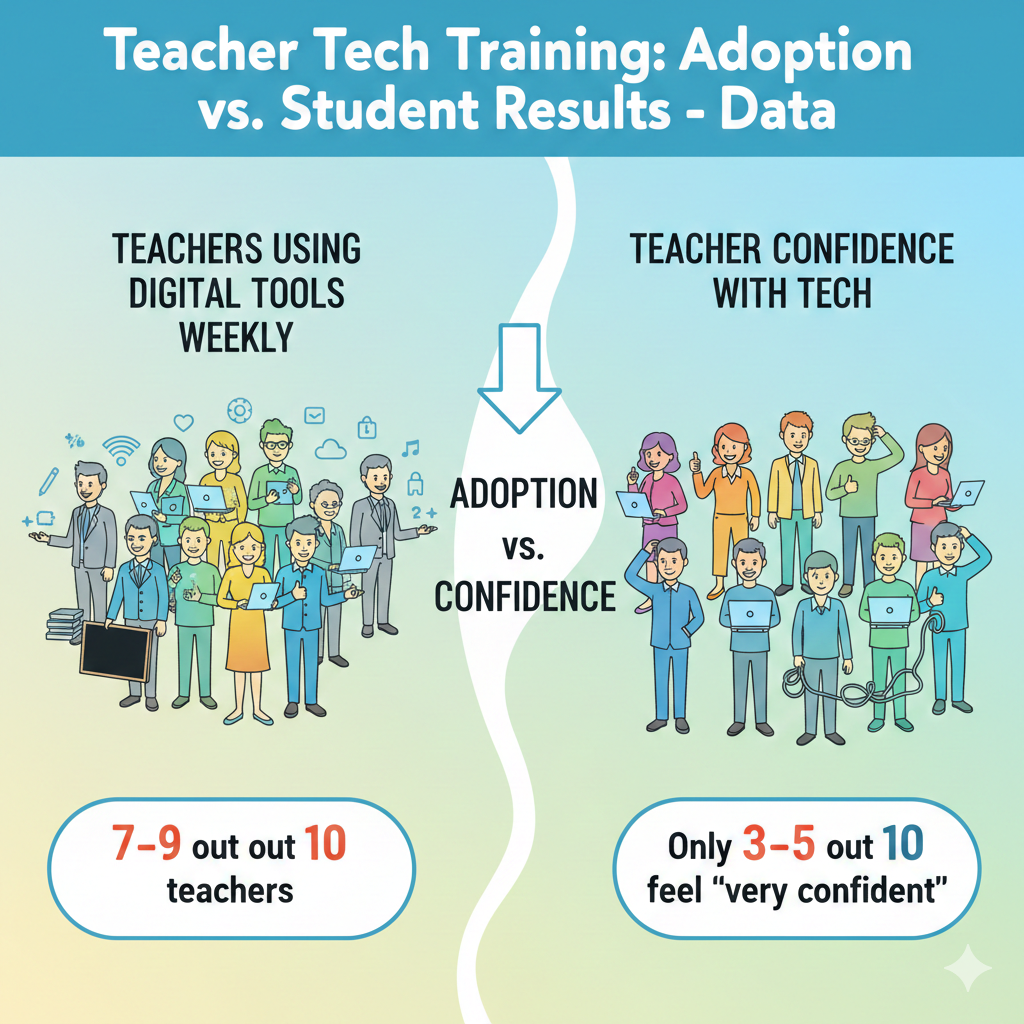
1) In many school systems, about 7–9 out of 10 teachers use at least one digital tool each week, but only about 3–5 out of 10 feel “very confident” using tech for teaching.
What this really means in a real classroom
Most teachers are already “using tech,” but a lot of that use is light. It often looks like showing slides, playing a video, taking attendance, or sending messages. That is not the same as using tech to teach, check learning, give fast feedback, and help each child improve.
This is why many schools feel busy with devices but do not see strong student growth. The tool is present, but confidence is missing, so the tool is used in safe, simple ways.
How to turn basic use into confident teaching use
Confidence does not come from hearing about a tool. It comes from using it in one clear teaching routine, again and again. If you lead a school, pick one tool and one simple learning task for four weeks. Keep it narrow.
For example, use one quiz tool for two quick checks each week, in one subject. Do not add extra tools during that month. During this time, protect teacher planning time so they can prepare the first few lessons without rushing.
Actionable steps you can start this week
Choose one lesson you already teach and add only one tech moment to it. Teach the concept as you always do. Then give students a short practice task using the tool. Then check the results right away. If most students miss the same idea, reteach that one point for three minutes.
This small loop builds confidence because it makes the tool feel useful, not random. Also create a simple backup plan for tech failure. Decide, before class, what you will do if Wi-Fi drops. When you have a backup, you stop fearing tech and you start leading the lesson again.
A parent’s view: what to look for when your child is “doing tech in school”
Ask your child a simple question: “Did the tool help you know what you got wrong?” If the answer is yes, the teacher is using tech for learning, not just for show. If the answer is no, the tech may be there, but the teaching use may still be growing.
If you want your child to learn with tech in a clear, teacher-led way, Debsie’s classes are built around routine, feedback, and steady practice, not just screen time.
2) When training is a one-time workshop, teachers often keep using the new tool after a few months only about 20–40% of the time; when training includes ongoing coaching, continued use is often about 60–80%.
Why one-time training fades so fast
One workshop can feel exciting. Everyone logs in, tries features, and leaves with good intentions. Then real school life hits. There are tests, meetings, behavior issues, and time pressure.
Without support, the tool becomes “one more thing,” so many teachers slowly stop using it. This does not mean teachers are lazy. It means habits do not form from one event. Habits form from small wins over time.
What ongoing coaching should look like
Coaching is not a long lecture. It is a short, steady check-in with one goal. A coach can be a tech lead, a strong teacher, or a mentor. The coach helps the teacher plan one lesson using the tool, watches a small part of the lesson, and then suggests one next step. The coach also helps solve small problems fast, so the teacher does not get stuck and quit.
A simple coaching plan that works
Set one tiny goal for two weeks, like “use exit tickets twice a week.” After each lesson, review results for five minutes. Ask three questions: Did students finish? Did the task show what they understood? What one change will make the next run smoother?
Then repeat. If your school cannot provide formal coaches, create peer pairs. One teacher tries the tool. The other teacher visits for ten minutes and gives one helpful note. Small, steady support is what keeps adoption alive.
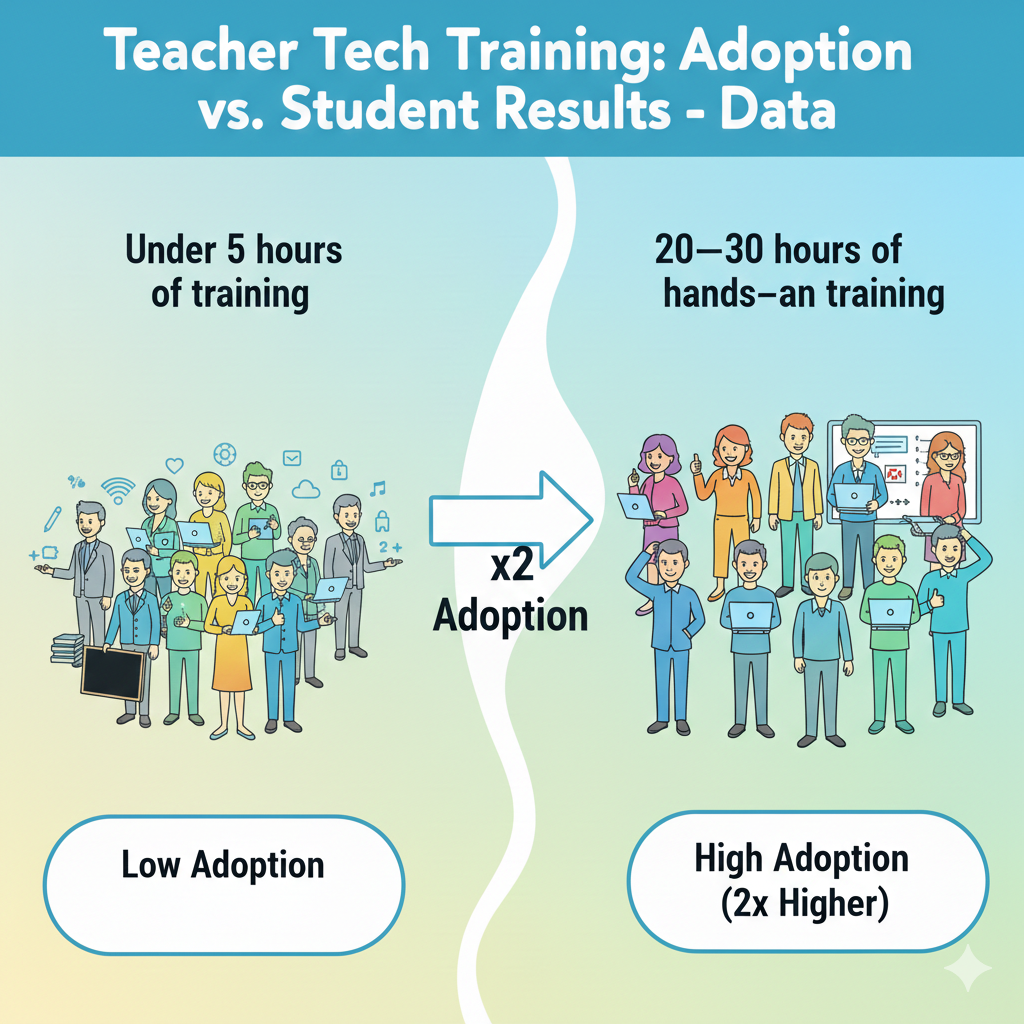
3) In schools that provide at least 20–30 hours of hands-on tech training across a semester, teacher adoption is commonly about 2× higher than in schools that provide under 5 hours.
Why hours matter more than hype
Short training often creates “surface skills.” Teachers learn where buttons are but not how to run the tool inside a lesson. Longer training across a semester allows practice, reflection, and adjustment. This is where real comfort forms. It also gives teachers time to see student results, which motivates continued use.
How to design training time that teachers will actually use
The goal is not to add meetings. The goal is to replace low-value time with high-value practice. If you lead a school, protect one short block weekly for hands-on work. Keep it practical. Teachers should build a real lesson during training, not just watch a demo. They should leave with something they can teach tomorrow.
A smart “20-hour” structure without overload
Spread training into small pieces. For example, one hour per week for 20 weeks. Each week has one target routine: quick checks, feedback, small-group work, writing practice, or review games. Teachers should try the routine in class, then bring back what worked and what failed.
This cycle turns hours into habits. It is the difference between “training” and “growth.”
4) Teachers are far more likely to adopt new classroom tech when training is classroom-ready: adoption is often ~50–70% when lessons are plug-and-play, versus ~20–40% when training is mostly theory.
Why “theory training” does not survive a busy week
Teachers do not avoid tech because they do not understand it. They avoid tech because they cannot afford a lesson to flop. When training is mostly theory, teachers leave with ideas but not with a ready lesson. When training is plug-and-play, teachers can use it immediately, see it work, and feel safer repeating it.
What “plug-and-play” training includes
It includes a full lesson flow: what to say, what students do, how long it takes, what to do when students get stuck, and how to check learning at the end. It includes sample questions and templates. It also includes a plan for different levels so faster learners are not bored and struggling learners are not lost.
How to make your training plug-and-play
If you are planning training, build it around one lesson per session. Give teachers a ready file they can copy and edit. Then have teachers practice running the lesson as if they are teaching. Keep the practice real.
Ask them to handle common problems: students forget passwords, the tool loads slowly, half the class finishes early. When teachers practice these moments, adoption rises because fear drops.
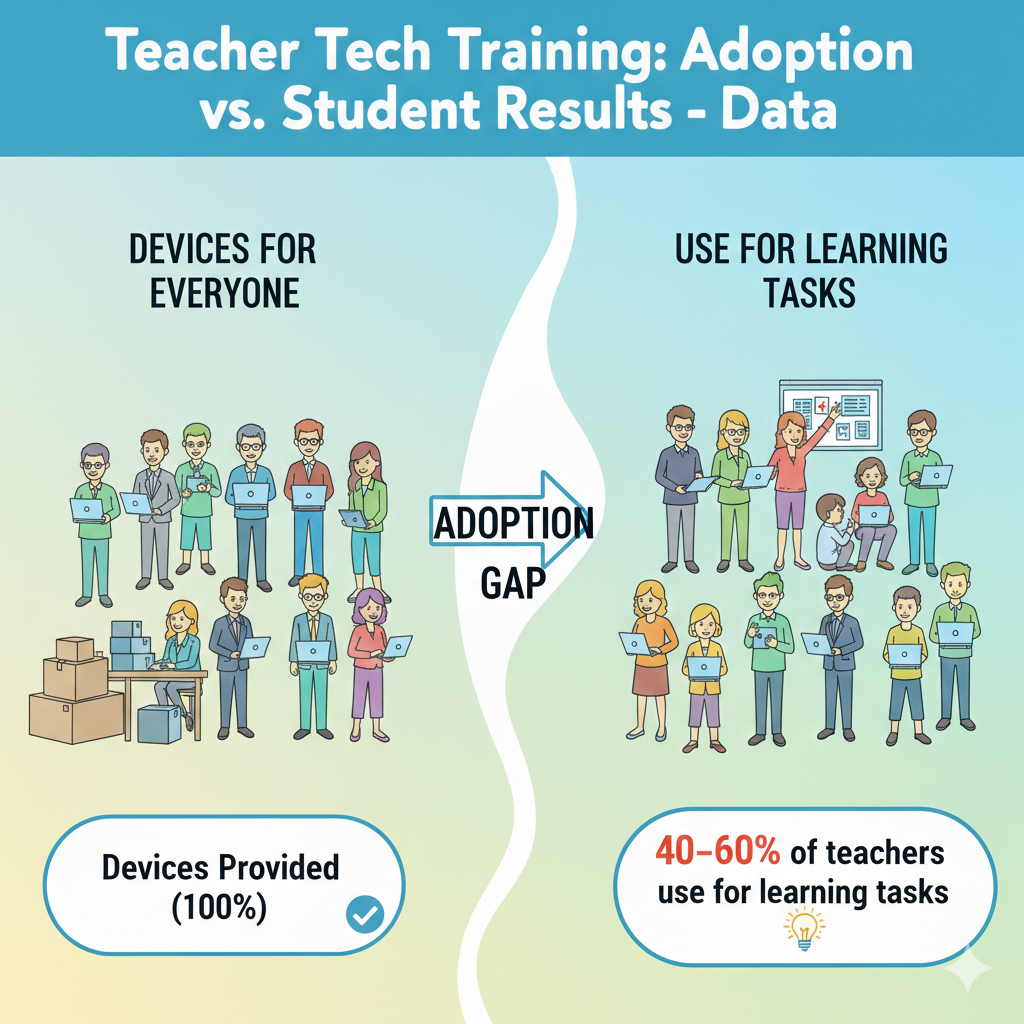
5) Even when a district buys devices for everyone, it’s common for only about 40–60% of teachers to use them for learning tasks, not just attendance, slides, or email.
The “device rollout” trap
Buying devices is a purchase. Improving learning is a system change. Many rollouts stop at distribution, so devices become admin tools, not learning tools. Teachers may use them for slides and messages, but students may not use them for practice, writing, creating, or getting feedback.
What counts as a true learning task
A learning task asks students to do thinking, not just watching. It could be solving problems, writing responses, coding a small program, building a model, recording an explanation, or revising work after feedback. If devices are not being used for these tasks, student results rarely change.
How to shift from teacher-screen tech to student-learning tech
Start with one subject and one routine. For example, in math, use devices twice a week for short practice with instant feedback. In language, use devices once a week for writing and revision. Train teachers on how to read student results and adjust the next lesson. Make this the focus. When devices have a clear learning job, teachers use them for more than slides.
6) A frequent pattern: teacher tech use rises quickly after training, but about 30–50% of teachers reduce usage within 8–12 weeks if there is no follow-up support.
Why usage drops after the “new” feeling wears off
Early weeks often feel exciting. Then the tool hits real friction: login issues, student off-task behavior, time pressure, and lesson pacing. Without follow-up, teachers feel alone with these problems, so they go back to old methods that feel safer.
What follow-up support must solve
Support must address the real pain points. It must help teachers keep pacing tight, manage devices, handle errors fast, and use data without extra work. It also must help teachers make the tool fit their style, not force them into a new personality.
A simple 12-week support plan
During the first 12 weeks, schedule short check-ins. Week 1–4: focus on running the routine smoothly. Week 5–8: focus on improving question quality and feedback. Week 9–12: focus on using results for small groups and reteaching.
If your school cannot do formal support, build a shared chat group for quick help and a shared folder of “ready lessons.” These small supports prevent drop-off.
7) The biggest “adoption blocker” reported by teachers is time: in many surveys, about 60–80% of teachers say they don’t have enough time to learn and plan tech-based lessons.
Why time pressure makes good tools feel impossible
Most teachers are not saying “no” to tech. They are saying “not today.” A school day is packed, and planning time is often small and broken into pieces. When a teacher is tired or rushed, they choose the path that will not crash in front of students.
Tech can feel like a risk because it may need setup, student logins, and extra steps. Even if the tool is helpful, the teacher may think, “I will try it when I have time,” and that time never comes. This is why adoption stalls even when teachers are willing.
How to make tech planning feel light, not heavy
The fastest fix is to stop treating tech as a separate lesson. Instead, attach tech to a routine the teacher already does. For example, if a teacher already checks understanding at the end of class, the tool becomes the new way to do that same check, not an extra activity.

The second fix is to reduce choice. Too many tool options waste time. One school-wide tool for quick checks is easier than ten tools with ten logins.
Action you can take this week
If you lead training, build “ready-to-teach” lesson shells that teachers can copy and run with small edits. Do not ask teachers to start from a blank page. If you lead a school, protect one short weekly slot where teachers build one tech routine together, then use it within forty-eight hours so it becomes real.
If you are a teacher, choose one class and one day per week for tech, then repeat the same pattern for four weeks. Repetition cuts planning time because the steps become automatic. When time is the blocker, the goal is not more effort.
The goal is fewer decisions and more reuse, so tech becomes the easiest option instead of the hardest.
8) Another common blocker is reliability: about 50–70% of teachers say they avoid tech lessons when internet/devices fail often.
Why one bad tech day can ruin a whole month
A tool can be wonderful and still fail at the worst moment. When a screen freezes, sound does not play, or Wi-Fi drops, a teacher loses minutes fast. Students notice. Some get bored. Some get noisy.
A teacher may feel embarrassed, even if it is not their fault. After one or two failures, the teacher starts avoiding tech lessons, not because they dislike learning, but because they want stability. Reliability is not a small detail. It is the base of trust.
How schools can raise reliability without buying new everything
The first step is to limit moving parts. When students must jump across many platforms, problems multiply. A smaller set of tools, used well, creates fewer login issues and fewer updates.
The second step is to test tools in the real classroom conditions. A tool that works in an office may fail in a room full of devices. The third step is simple routines: devices charged, headphones ready, and clear rules for where to click first.
The teacher’s “calm backup” that keeps learning going
Every tech lesson should have a backup that can start in under one minute. This backup should be the same learning goal, just without the device. For example, if the tech activity is a short quiz, the backup is the same questions on paper or on the board.
The key is planning the switch before class, not during the failure. Also, teach students one quiet routine for tech trouble, such as raising a hand and continuing with the next question on paper. When students know what to do, the room stays calm.
When the room stays calm, teachers stop fearing tech. And once fear drops, adoption rises naturally, because teachers trust they can still teach even on a messy day.
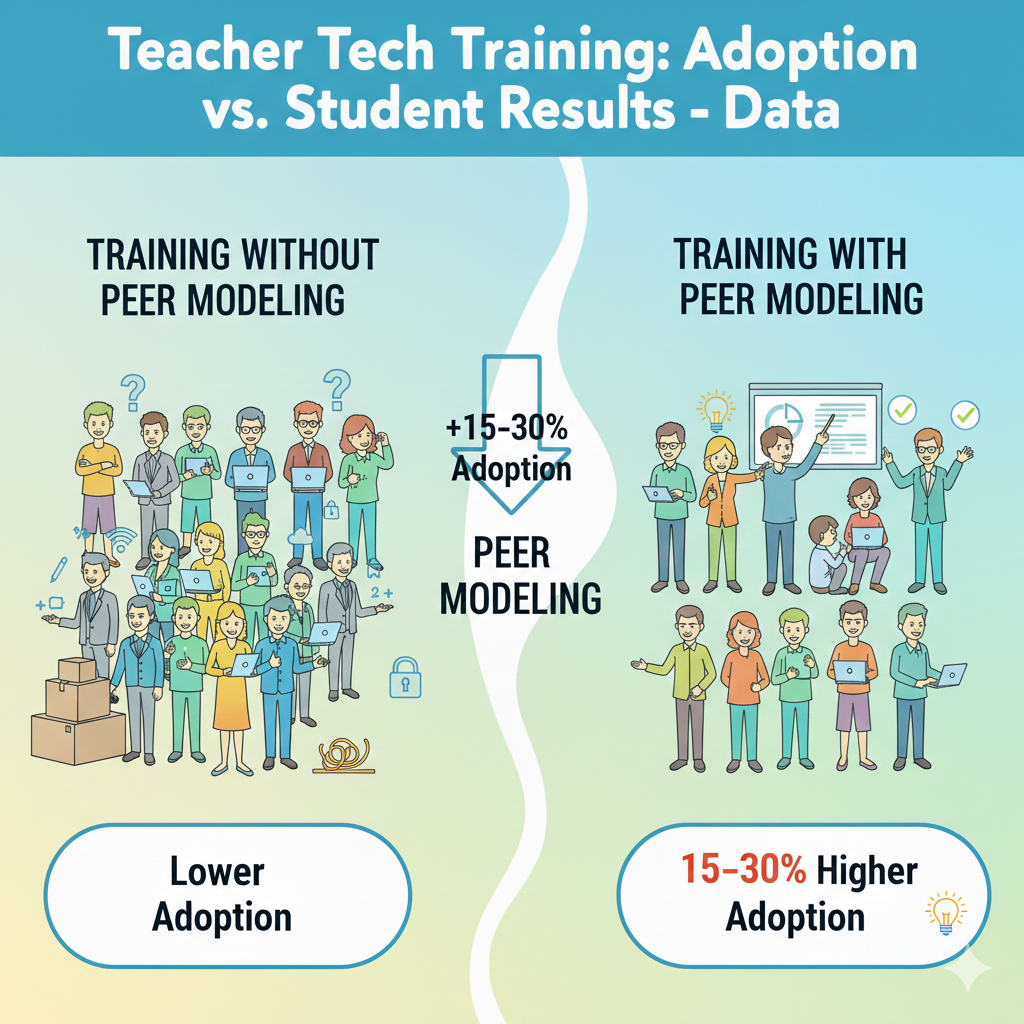
9) Training that includes peer modeling often produces about 15–30 percentage points higher adoption than training without peer modeling.
Why seeing a real class beats any slideshow
Many trainings show a perfect demo. Perfect demos are not convincing because real classrooms are not perfect. Teachers want to know what happens when a student forgets a password, when half the class finishes early, or when the tool loads slowly.
Peer modeling answers these questions without shame. When a teacher watches another teacher run the tool with real students, the tool stops feeling like an “extra program” and starts feeling like a normal lesson move.
What peer modeling should actually show
The best peer modeling is not about fancy features. It is about flow. It shows how the teacher gives directions in simple words, how the teacher checks who is stuck, how the teacher keeps the pace, and how the teacher uses results to teach again.
It also shows classroom control, because tech without control becomes chaos. Teachers learn small lines that work, like how to start, how to pause, and how to reset attention.
A simple way to run peer modeling in your school
Keep the visit short and focused. Ten to fifteen minutes is enough if observers know what to look for. Before the visit, set one clear goal, such as “watch how students get started in the first two minutes” or “watch how the teacher uses the results to reteach.”
After the visit, do a quick talk where the host teacher shares one thing that went wrong and how they handled it.
This makes the learning honest and useful. Then each observer tries the same routine within the next week, while the memory is fresh. Peer modeling works because it replaces fear with proof. It quietly tells the teacher, “This can work in a room like yours.”
10) Teachers who get in-class coaching even a few times per month often show about 1.5–2× higher “deep use” than teachers who only get a help-desk.
Why a help-desk fixes tools but not teaching
A help-desk can solve logins, update apps, and reset passwords. That is important, but it does not change how a lesson runs. Deep use means the tool becomes part of teaching, not just a side activity. It means students practice, get feedback, revise work, and build skills.
That kind of use needs someone to look at the lesson itself, not only the device.
What deep use looks like in daily class life
Deep use is not “students are on screens.” Deep use is “students are doing thinking.” In deep use, the teacher sets a clear goal, starts the activity fast, watches student responses live, and makes quick choices.
The teacher may pause the class to reteach one idea, or pull a small group while others keep working. The tech is not the star. Learning is the star. The tool is just a fast way to practice and check progress.
How to coach in a way teachers welcome
Good coaching feels like support, not inspection. Keep it small. A coach can sit in for ten minutes and focus on one moment, like the first two minutes of setup or the last five minutes of checking answers. Then the coach gives one next step the teacher can try tomorrow.
For example, “Use one short slide with three steps before students open devices,” or “Set a timer so the activity ends on time.” The coach should also model one line the teacher can say to students, because words matter in classroom control. If your school cannot hire coaches, you can build “buddy coaching.”
Two teachers agree to watch each other once a month and share one idea each time. The goal is not to rate anyone. The goal is to help the tool become simple and repeatable. When teachers feel coached, not judged, they keep using the tool until it becomes natural.
11) In many districts, the share of teachers who move from “basic use” to “learning use” is only about 20–35% without targeted training.
Why basic use is comfortable but limited
Basic use is easy to adopt because it does not change teaching much. Slides replace the board. Videos replace a short lecture. Email replaces paper notes. These are helpful, but they do not always increase student learning because students can stay passive.
Learning use is different. It asks students to respond, practice, and show what they know. That is where growth comes from, but it also demands stronger routines, better questions, and real planning.
The training gap that keeps teachers stuck in basic use
Many trainings focus on features instead of outcomes. Teachers learn where buttons are, but not how to turn those buttons into learning moments. They also do not get enough practice building strong questions. A quiz tool is only as good as the questions inside it.

If the questions are too easy, too hard, or unclear, the results do not help. Then the teacher feels the tool is not worth it.
How to move teachers into learning use step by step
Targeted training should teach one learning move at a time. Start with quick checks for understanding, because it is simple and powerful. Train teachers to write questions that reveal thinking, not just memorization. Then train teachers to read results in one minute and decide what to do next.
Next, add a second move: feedback and revision. Teach teachers how to give one clear comment and how to ask students to fix one part of their work. If you are leading a school, name the move you are building this month and celebrate it.
If you are a teacher, pick one class and commit to one learning move weekly. When training is targeted, teachers stop hovering at “basic use” and start using tech to create real growth.
12) When training focuses on one tool plus one teaching goal, teachers are often about 2× more likely to keep using it than when training covers many tools at once.
Why “too many tools” makes teachers quit
When training covers many tools, teachers leave with a long list and no clear next step. They may remember a few features, but they do not remember a routine they can run tomorrow. Too much choice creates delay. Delay kills adoption.
A teacher also cannot build trust in five tools at the same time. They need repetition to feel safe.
How one tool and one goal creates fast wins
Pick one tool that fits your school’s needs and keep the goal simple. For example, one tool for exit tickets, or one tool for math practice with instant feedback. Then train teachers on how to use it for that one goal in a repeatable way.
When teachers see students respond well, they feel rewarded. That reward is what keeps the habit alive. Once the routine is strong, adding new features becomes easy because the base is already stable.
A practical way to plan “one tool, one goal” training
Start by choosing the goal in plain words. “I want to know who is confused before the test.” Or “I want students to practice reading every week.” Then choose the tool that does that job with the fewest steps. Next, design one standard lesson flow: start, directions, work time, check results, next action.
Give teachers a ready template so they can copy it. After two weeks, collect simple stories: what worked, what did not, and what you changed. This keeps learning real. If you are a teacher, do the same in your own class. Commit to one tool for one goal for four weeks.
Track one simple result, like quiz accuracy or homework completion. When the goal is clear, the tool feels like help, not clutter.
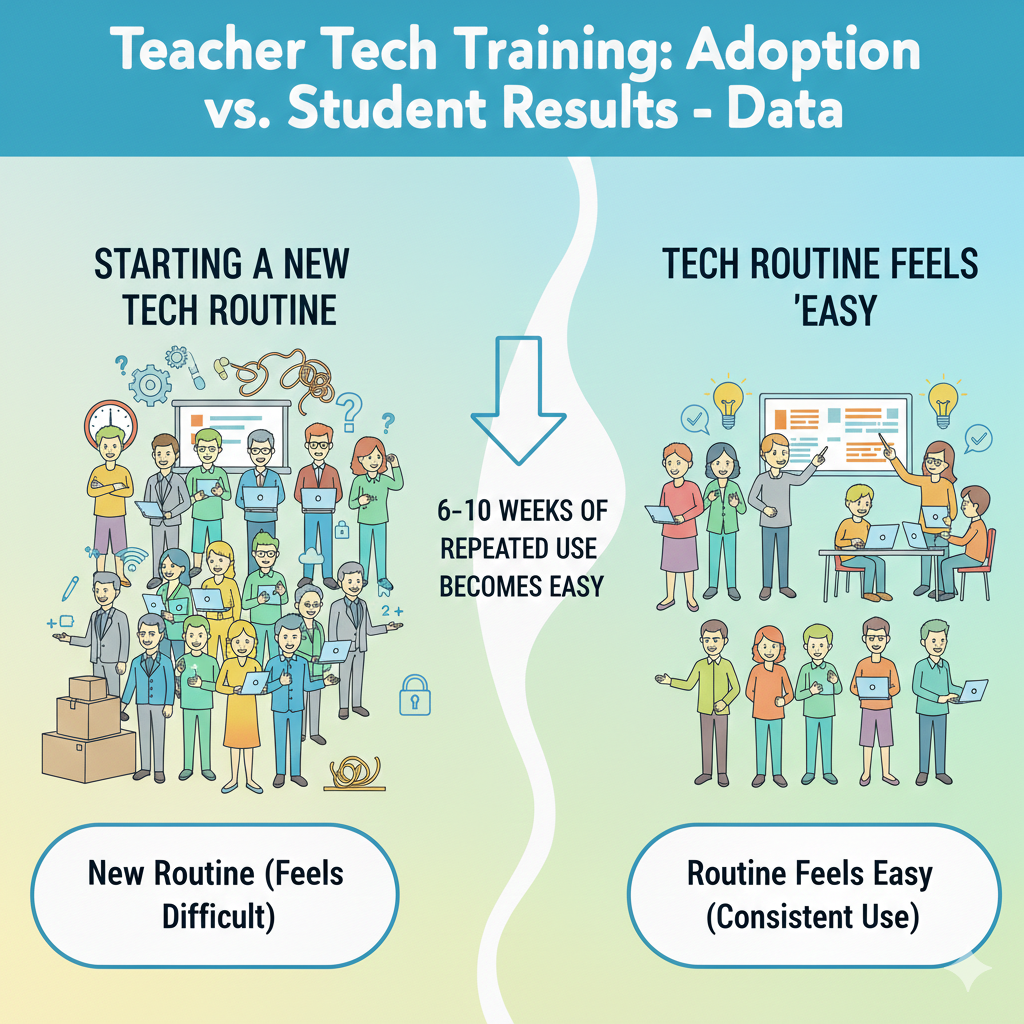
13) Teachers commonly report that it takes 6–10 weeks of repeated use before a new tech routine feels “easy” and consistent.
Why the first weeks feel awkward
A new routine always feels slow at the start. Teachers must remember steps, students must learn expectations, and small errors pop up. During this phase, many people think, “This tool is not for me.” But what is really happening is normal habit building.
In week one, even simple actions like logging in and finding the right assignment can eat time. In week two, you may fix one issue and discover another. That is not failure. That is the routine forming.
How to make the 6–10 weeks shorter and smoother
The key is repetition with the same pattern. If the teacher changes the tool or activity style every week, students never build muscle memory, and the teacher stays stressed. Pick one routine and keep it stable.
Use the same starting steps, the same way of giving directions, and the same ending step. Keep class language consistent, too. Students learn fast when the teacher uses the same short phrases for “open,” “start,” “pause,” and “submit.”
What to do across a ten-week rollout
Plan the first month as “smooth running,” not “perfect learning.” In weeks 1–2, focus on fast setup and clear rules. In weeks 3–4, focus on timing so the tech activity fits the lesson without rushing. In weeks 5–6, improve the quality of tasks, like stronger questions or clearer writing prompts.
In weeks 7–10, use results to adjust teaching, such as reteaching a missed skill or grouping students for support. If you lead a school, tell teachers ahead of time that week one will feel messy, and that is expected. If you are a teacher, keep a simple note after each tech lesson: what slowed you down and what you will change next time.
This keeps improvement steady and prevents the common mistake of quitting too early. Consistency is not about talent. It is about repeating the same routine until it becomes automatic.
14) A typical finding: teachers with strong tech training spend about 10–20 minutes less per day on grading and administration because of automation, freeing time for instruction.
Why time savings only happen with the right setup
Many teachers hear “tech saves time” and do not believe it, because early use can take longer. Time savings show up after routines are set and tools are used for the right jobs. If a tool simply adds steps, it will not save time.
But when a tool checks answers fast, scores simple tasks, organizes work, and stores results in one place, it can reduce daily paperwork and repeated grading.
Where automation can realistically help
Automation works best for frequent, small tasks. Short quizzes, practice problems, spelling checks, and basic skill review can be auto-checked. Attendance and quick communication can also be streamlined. The big win is not that teachers never grade.
The big win is that teachers spend less time counting points and more time looking at patterns, like which skill students missed and why. That shift helps student growth because the teacher’s time goes into teaching moves, not admin tasks.
How to set up automation so it actually saves time
Start by choosing one area where you spend time every day. It could be checking homework, collecting exit tickets, or scoring a warm-up. Then set up one tool to handle the collection and basic scoring. Keep your grading rules simple at first.
For example, auto-grade multiple choice, and manually review only the short answer for a few students each day. Use the saved minutes for one high-impact action: pull a small group, give quick feedback, or reteach one point. If you lead a school, train teachers on how to use tool reports without drowning in data.
Teach them to look for one pattern: the most-missed question and the skill behind it. That is enough. If teachers can reliably save even ten minutes a day, that becomes real breathing room, and adoption becomes easier because the tool feels like help, not extra work.
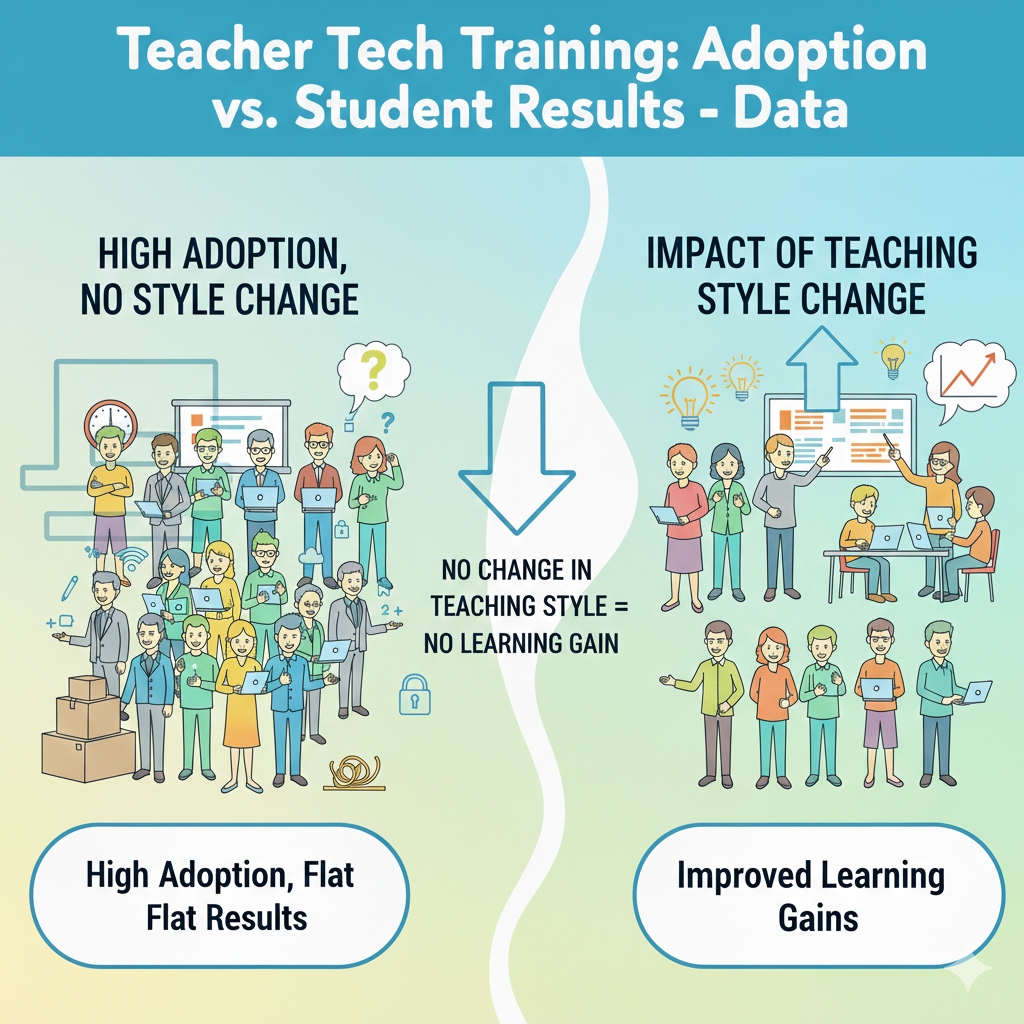
15) On the student side, programs that improve adoption but don’t change teaching style often show little to no learning gain, even if adoption goes up.
Why “using tech” is not the same as “learning more”
A school can proudly say, “Teachers are using the platform,” and still see flat test scores. This happens when tech is added on top of old teaching without changing the learning process.
If students are mostly watching, clicking randomly, or completing low-level tasks, results will not rise. Tech adoption is a measure of access and activity. Student growth is a measure of understanding and skill. Those are not automatically linked.
The teaching moves that must change for results to rise
Student results improve when tech supports active learning. That includes practice with instant feedback, clear explanations, writing and revision, problem solving, and reflection. It also includes teacher action after the tech activity.
The teacher must respond to what the data shows. If half the class missed a concept, the teacher needs a short reteach. If a group is far behind, they need simpler steps and more guided practice. If a group is ahead, they need deeper tasks. Without these moves, tech becomes noise.
How to connect adoption to real learning gains
Begin with one clear learning goal, not a tool goal. For example, “Students will master fractions” or “Students will write clear paragraphs.” Then use tech for a specific part of that goal, such as practice or feedback. After each tech activity, do one teaching action based on results.
This can be as simple as rewriting one example on the board and explaining it again, or pulling five students for a quick mini-lesson. If you lead a school, ask teachers to share not just “how often we used the tool,” but “what we changed in teaching because of what we saw.”
That question shifts the culture from adoption to impact. When teaching style changes in small but steady ways, student results finally follow.
16) Student learning gains are most often seen when tech supports high-frequency practice plus instant feedback; these setups commonly show small-to-moderate improvements versus “watching videos” alone.
Why practice with feedback beats passive screen time
Watching a video can explain an idea, but it does not prove the student understood it. Many students feel they “get it” while watching, then struggle when they must solve a problem alone. Practice changes that.
When students answer questions, make mistakes, and get instant feedback, their brain adjusts. They learn what to do, not just what to hear. This is why tools built around short practice and quick correction tend to show better gains than tools used mainly for video watching.
What “high-frequency practice” should look like
High-frequency does not mean long hours. It means short sessions that happen often. Ten minutes, three times a week can be stronger than one long session once a week. The goal is to keep skills fresh and build memory through repetition.
Instant feedback matters because it stops students from practicing the wrong method for too long. It also lowers frustration, because students see what went wrong right away and can try again.
How to set up this kind of tech use in class
Choose one skill area and one routine. For example, in math, start class twice a week with a five-to-eight minute practice set that auto-checks answers. In reading, use a short comprehension check after a passage.
Then follow with a brief teacher response. If many students miss the same point, do a two-minute reteach on that exact mistake. If only a few miss it, pull them for a quick help moment while others continue.
If you are a parent, look for tools that do not just show content, but ask your child to respond and then correct them. That is where growth happens. At Debsie, we build learning around active work with teacher guidance, because practice plus feedback is the engine that turns effort into real skill.
17) A common “dose” pattern: students who use an effective practice tool at least 2–3 times per week tend to show noticeably better progress than students who use it less than once per week.
Why frequency matters more than motivation speeches
Many programs fail because they treat practice as optional. Students might use the tool once, then skip it for weeks. Learning does not work like that. Skills grow when practice is close together, so the brain can remember the last attempt and improve.
When there are long gaps, students forget steps and must relearn. This wastes time and makes them feel “bad at it,” even when they could improve with steady practice.
How to build a 2–3 times per week habit without fights
The easiest way is to attach practice to a fixed schedule. For example, every Monday, Wednesday, and Friday at the same time. Keep sessions short so students can start without dread. Also keep the start step easy.
If login is hard, the habit breaks. For schools, the best approach is to use practice tools during class time, not only as homework. Homework use becomes uneven because home access and support differ. Class time creates fairness.

How teachers and parents can track the “dose” simply
Do not track everything. Track one thing: did the student complete the session? Many tools show minutes or activities completed. Set a clear target, like three short sessions per week. Celebrate consistency, not perfection. If a student misses a session, avoid shame.
Just return to the schedule. If you are a teacher, build a quick routine at the start or end of class. If you are a parent, tie the practice to a daily anchor, like after snack or before dinner, and keep it brief. The point is repeated contact, not long screen marathons.
When students hit the right dose, progress becomes more visible, and confidence rises because they see improvement.
18) In reading and math practice tools, typical gains show up when students get 30–60 extra minutes per week of targeted practice; below that, gains are often minimal.
Why “targeted” minutes matter more than total minutes
Not all screen time is equal. A student can spend an hour on a device and learn very little if the tasks are too easy, too random, or not tied to what they need. Targeted practice means the tool focuses on the skill the student is ready to learn next, at the right level of challenge.
When practice is targeted, even thirty minutes can move the needle. When it is not targeted, even sixty minutes may feel like busy work.
How to reach 30–60 minutes without burning students out
Think in small blocks. Ten minutes, three to five times a week, reaches the target without overwhelming students. Keep the sessions short enough that students can finish with energy left. Also keep the tasks specific.
In math, focus on one type of problem set at a time. In reading, focus on one skill, like main idea, vocabulary in context, or short written responses. When the focus is clear, students feel progress faster.
How to ensure practice is truly targeted
The teacher must guide the target. Tools can suggest levels, but human judgment matters. Check where students struggle most, then assign practice that matches that need. After practice, ask students to explain one question they got wrong and how they fixed it.
This turns practice into learning, not just clicking. If you lead a school, train teachers to set weekly targets, not open-ended assignments. If you are a parent, ask your child what skill they are working on this week.
If they cannot answer, the practice may not be targeted. In Debsie programs, we aim for focused practice and clear goals because that is how time turns into results.
19) In many implementations, only about 30–50% of students hit the recommended weekly usage time unless teachers actively monitor and nudge.
Why “self-paced” often turns into “no pace”
Many schools hope students will use learning tools on their own. The idea sounds nice, but real life is different. Students forget, get distracted, or do the minimum.
Some students may not understand why the tool matters, so they do not feel a reason to keep going. Others may avoid it because they fear mistakes. This is why usage targets are missed so often when adults do not guide the routine.
What monitoring should look like without feeling strict
Monitoring does not mean policing. It means making the routine visible and normal. Teachers can do a quick check once or twice a week to see who is behind. Then they can give a calm reminder and help students restart.

The key is tone. If reminders feel like punishment, students hide. If reminders feel like support, students cooperate. The best approach is to talk about the tool as practice, like sports training. You do it regularly to get stronger.
How to nudge students in a way that builds pride
Start with clear expectations. Students should know the weekly target in simple terms, like “three short sessions.” Then make progress visible. A teacher can say, “Today we will all finish our second session.” When students are behind, the teacher can offer a quick catch-up time during class.
Also ask students to set a small goal, like improving by two points or finishing one level. Goals make effort feel meaningful. If you are a parent, the same idea works at home. Set a short time window and keep it steady each week.
Then ask one question after practice: “What did you learn today?” This keeps the work connected to growth. Monitoring plus gentle nudges does not limit independence. It creates the structure students need to build habits that lead to real results.
20) When teachers use dashboard data to adjust instruction weekly, student growth is often higher than when data is checked monthly or rarely.
Why weekly adjustments change outcomes
Monthly data checks are too slow. A student can struggle for weeks before anyone notices. By then, the gap is bigger and harder to fix. Weekly checks keep learning tight. They help teachers catch confusion early, correct it, and move on.
This is one of the clearest bridges between tech adoption and student results. The tool is not just collecting numbers. It is guiding teaching decisions.
What “using data” should actually mean
Using data does not mean staring at charts for an hour. It means answering one simple question: “What did most students miss?” Then taking one simple action: “I will reteach that point for five minutes and give a new practice set.”
It can also mean grouping. If five students are stuck on the same skill, that becomes a small group lesson. If another group is ready to move ahead, they get a harder task. The data’s job is to help the teacher aim instruction, not to create extra paperwork.
A weekly data routine teachers can manage
Pick one day each week to review results for ten minutes. Look for the top missed question or skill. Then plan one reteach moment and one follow-up check. Keep it small. In the next lesson, do the reteach early, then give a short check question to confirm understanding.
If you lead a school, train teachers to use a simple template: “Missed skill, reteach plan, check plan.” This keeps data use practical. If you are a parent, ask your child’s teacher or tutor what they are adjusting based on recent work.
When teaching is adjusted weekly, students feel seen. They also improve faster because mistakes are corrected while they are still fresh.
21) A frequent result: “Tech-rich” classrooms without strong teacher training show wide variation—some students improve a lot, but many show little change, increasing uneven outcomes.
Why tech can widen gaps when teaching support is weak
When classrooms are full of devices, students with strong skills often move quickly. They can read instructions, manage tasks, and persist through errors. Students who struggle may get stuck, give up, or click randomly.
If the teacher does not have strong training on how to guide tech use, the stronger students benefit more, and the struggling students fall further behind. This is how tech can accidentally increase learning gaps.
What teachers need to prevent uneven results
Teachers need clear routines for support. They need ways to spot who is stuck fast, and they need a plan for what happens next. That plan might include small-group help, simplified steps, or guided practice before independent work.

Teachers also need training on choosing tasks at the right level. If a task is too hard, students shut down. If it is too easy, students waste time. The teacher’s role becomes even more important in tech-rich spaces, not less.
How to keep results more even across students
Use structured rotation. While most students work on the tool, the teacher meets a small group for direct support. Then the groups switch. Keep directions simple and repeat them every time. Also create “early finisher” tasks so advanced students stay engaged without racing ahead in a way that leaves others behind.
If you lead a school, measure not only average growth, but growth for students who started behind. If that group is not improving, training must focus on differentiation and classroom routines.
If you are a parent, look for programs where teachers actively guide learning instead of letting kids drift alone on a platform. Debsie’s approach is teacher-led and structured, because structure is what helps all students grow, not just the ones who were already ahead.
22) In schools where teachers receive training on differentiation, the share of students working at the “right level” in digital practice often rises from about 40–50% to about 60–75%.
Why “right level” is the real secret
When practice is too hard, students feel lost and stop trying. When practice is too easy, students feel bored and stop caring. In both cases, time is wasted. The “right level” is where a student must think, make some mistakes, and still feel they can improve.
This is where growth happens. Many schools struggle here because they assume the tool will place students perfectly on its own. Tools help, but they are not magic. Teachers still need the skill of differentiation.
What differentiation training should actually teach
Differentiation is not creating ten separate lesson plans. It is making smart groups and smart choices. Teachers need to learn how to read tool data and spot patterns. They need to know how to adjust levels, assign different sets, and use scaffolds.
Scaffolds are small supports, like step-by-step hints, worked examples, or sentence starters in writing. Teachers also need a plan for pacing. Some students need more time and more guided practice before they can work alone.
How to raise “right level” practice in your classroom
Start by checking where students are placed. Pick a small sample of students and watch them work for five minutes. If they are guessing, the level is too hard. If they are finishing without thinking, it is too easy. Adjust. Then create three simple groups: support, on-level, and stretch.
The support group gets shorter tasks with more guidance. The stretch group gets deeper tasks that require explanation, not just faster clicking. Recheck weekly, because students change quickly. If you lead a school, teach teachers how to do this in ten minutes, not an hour.
The goal is to make differentiation light enough to use every week. When more students practice at the right level, learning becomes fairer and faster, and technology starts doing what it promised.
23) When tech is used mainly for whole-class display, student outcomes typically improve less than when students use tech for active practice, writing, coding, or creation.
Why “teacher screen tech” has a ceiling
A projector, a smart board, and a slide deck can make teaching smoother. But students can still be passive. They can nod, copy, and forget. Whole-class display is mostly about presenting information.
Presentation is only one part of learning. Students grow when they must do the work themselves, struggle a bit, and then correct their thinking. That is why active use tends to drive stronger outcomes.
What active use looks like across subjects
In math, active use means students solve problems and get feedback, then explain their method. In reading, it means students answer questions, write responses, and revise.

In science, it can mean simulations where students change variables and record outcomes. In coding, it means building small programs and debugging errors. In all cases, the key is that students create something or respond in a way that shows thinking.
How to shift your classroom from display to active learning
Keep the display part short. Use it to teach the idea and show one example. Then move to student action. Assign a short activity where every student must respond. Use the tool to collect responses fast so you can see who understands.
Then do a quick teaching move based on what you see. If you lead a school, train teachers to design lessons with a clear ratio: brief input, then active student work. If you are a parent, ask your child, “Did you do something today, or did you just watch?” That question reveals a lot.
Programs like Debsie focus on student doing, because real skill comes from practice, creation, and feedback, not from watching alone.
24) In many studies and audits, about 25–45% of logged student tech time is “low learning value” unless teachers have clear routines.
Why logged minutes can be misleading
A dashboard might show students spent forty minutes on a platform. That sounds good, but minutes do not equal learning. Students can be off-task, stuck, or repeating easy tasks without thinking. Some may rush and guess.
Others may open the tool and not truly engage. This is why a large share of tech time can become low value when clear routines are missing.
What creates low-value time in tech use
Low-value time often comes from unclear directions, weak task choice, and poor pacing. If students do not know what success looks like, they wander. If the task is at the wrong level, they either quit or coast.
If the teacher does not check progress during the session, students can drift for long periods. Also, transitions can waste time. If it takes ten minutes to log in and find the assignment, the learning window shrinks.
How to raise the learning value of tech time
Start every session with a short goal students can repeat. For example, “Today we will practice dividing fractions and explain one answer.” Then set a timer so the session has a clear end. During the session, do quick scans of the dashboard or walk around to see screens and body language.
If many students are stuck, pause and reteach for two minutes. If many are finished, push them to explain answers, not just finish. End the session with a short reflection, like one sentence about a mistake they fixed.
If you lead a school, train teachers on routines first, tools second. Routines protect learning time. When routines are strong, minutes become meaningful, and the same device time produces much better results.
25) Training that includes classroom management for devices often reduces off-task behavior by about 20–40% compared with “no-routines” device use.
Why management training matters as much as tool training
Many tech plans fail for a simple reason: students are students. If they can click away, some will. If they can message friends, some will. If they do not understand what to do, some will wander.
Teachers often blame themselves or the tool, but the real issue is missing routines. Classroom management for devices is not about being harsh. It is about keeping learning smooth so students stay focused and the teacher stays in control.
What device management routines should include
Students need a clear start routine, a clear working routine, and a clear stop routine. Start routine means devices stay closed until directions are finished.
Working routine means students know what to do when they are stuck, and how to ask for help without shouting across the room. Stop routine means screens go down when the teacher needs attention. Without these simple rules, even strong tools can become distractions.
How to build routines that reduce off-task behavior fast
Begin with one rule you can enforce calmly every time. For example, “Screens down when I say ‘pause.’” Practice it like a drill for a week. Next, use “chunking.” Give tasks in short blocks with clear timers, so students do not drift. Then add accountability that feels fair.
This could be a quick exit question, or asking a few students to explain what they learned. When students know they may be asked to explain, they focus more. If you lead a school, include management practice in training. Have teachers role-play common problems, like a student switching tabs or refusing to log in.
If you are a teacher, write your three routines and teach them like you teach any skill. Students do not automatically know how to learn with devices. They must be taught. When routines are strong, off-task behavior drops, lessons move faster, and teachers feel safe using tech regularly.
26) Teacher comfort strongly predicts student use: classrooms led by “high-confidence” teachers often show about 2× more consistent student engagement with learning apps than “low-confidence” classrooms.
Why students mirror teacher confidence
Students can sense uncertainty. When a teacher seems unsure, students push boundaries, ask more off-topic questions, and lose focus faster. When a teacher is calm and clear, students follow the routine. This is not about personality.
It is about clarity. High-confidence teachers give directions that are short, specific, and repeated the same way each time. They also handle small problems quickly, which keeps the class moving.
What high-confidence teachers do differently
They start the activity fast. They do not spend five minutes explaining every feature. They give one simple goal and begin. They also keep their eyes on learning, not on the tool. They check progress early, so students who are stuck do not drift.
They use the tool’s results to make a visible teaching move, like reteaching a missed skill. This shows students the tool matters, because it changes what happens next in class.
How to build confidence without being “good at tech”
Confidence comes from a repeatable script. Write down your steps for the first two minutes of device time. Use the same words every lesson. Also prepare for the top three problems: forgotten password, slow load, and student off-task clicks.
Decide your response ahead of time. For example, a student with login trouble starts on a paper version for five minutes while the teacher fixes the login later. This prevents the whole class from stopping. If you lead a school, train teachers on scripts and problem plans, not just features.
If you are a parent, you can spot confidence by asking your child, “Did your teacher give clear steps and keep everyone working?” When teachers feel steady, students stay engaged, and consistent engagement is what creates progress.
27) When teachers learn to give feedback through digital tools, turnaround time often drops from days to hours, and students are more likely to revise and improve work.
Why fast feedback changes student behavior
When feedback comes days later, students often forget what they were thinking. The work feels finished, so they do not want to revisit it. Fast feedback keeps the task alive. Students can fix mistakes while the idea is still fresh.
This is one of the most powerful ways tech can improve learning, because it strengthens the loop between effort and improvement.
What digital feedback should look like to be effective
Feedback must be small and clear. Long comments are often ignored, especially by younger students. The best feedback points to one thing to change and one way to change it. For writing, that might be “Add one detail to explain why.”
For math, it might be “Show your steps for the second part.” Digital tools can help by allowing quick comments, rubrics, or even audio notes, but the key is the teacher’s focus: one priority at a time.
How to build a feedback-and-revision routine that students follow
Start with a simple rule: every assignment gets one teacher note and one student revision. Keep the revision short. Students might fix one sentence, redo one problem, or add one explanation. Then set a quick deadline, like “revise by tomorrow.”
The tool should make it easy to see who revised and who did not. If you lead a school, train teachers on how to comment quickly using templates and common phrases, so feedback does not become a time drain.
Also train students on how to respond to feedback, because many students do not know what “revise” means in practice. When feedback is fast and revision is normal, students begin to see mistakes as part of learning, not as shame. That mindset shift is a quiet but strong driver of better results.
28) A common math finding: digital practice works best when paired with teacher instruction—blended models often outperform “tech-only” use by a noticeable margin.
Why tech-only learning often stalls
Math is not only about getting answers. It is about methods, mistakes, and meaning. A tool can give practice and feedback, but it cannot always notice why a student is confused. One student may miss a question because they forgot a rule.
Another may miss it because they misunderstand the idea. If both students get the same automated hint, one may improve and the other may stay stuck. Teacher instruction fills this gap. A teacher can hear a student explain their thinking, spot the real problem, and fix it with the right example.
What a strong blended math lesson looks like
A blended lesson uses the best of both worlds. The teacher teaches a concept clearly with one or two strong examples. Then students practice digitally in short bursts, so feedback is quick and errors are caught early. The teacher watches results and adjusts.
If many students miss the same step, the teacher pauses and reteaches. If a small group is behind, the teacher pulls them for guided practice while others continue. This is not “tech time plus teacher time.” It is one learning loop where each part supports the other.
How to build blended learning without making it complicated
Keep the structure stable. Start with five minutes of direct teaching, then ten minutes of digital practice, then five minutes of review and correction. Use the same pattern each week so students know what to expect. Choose practice tasks that match the day’s goal, not random review.
After practice, ask a few students to explain one answer, including a mistake they fixed. This makes learning visible and shows that practice is not just clicking. If you lead a school, train teachers on how to use practice data to choose the next example or the next small group.
If you are a parent, look for programs that do not leave your child alone with a platform. Debsie’s math learning is designed to be guided and interactive, because math improves fastest when practice and teaching work together.
29) Equity gap pattern: without targeted support, students who already perform well are often about 1.5–2× more likely to use learning tools consistently than students who struggle.
Why struggling students use tools less, even when they need them more
Students who are already doing well often enjoy practice because it feels rewarding. They finish tasks, earn points, and feel smart. Struggling students often face the opposite. They hit errors quickly, feel frustrated, and may think the tool is “proof” they are not good.
They may also need help reading directions or starting tasks. Without support, they avoid the tool, so they get less practice, and the gap grows. This pattern is common and it is not the child’s fault. It is a design and support issue.
What targeted support should include
Targeted support means reducing friction and increasing success. First, make the start easy. Logins, directions, and first steps should be simple. Second, provide guided practice before independent practice.
A struggling student may need to do two problems with the teacher first, then try alone. Third, provide tasks at the right level so the student can succeed with effort. Fourth, celebrate progress in small steps. If a student improves from 2 correct to 4 correct, that matters.
How schools and parents can close the consistency gap
In school, schedule tool use during class so the teacher can support students who need help starting. Use small groups to give quick instruction before practice. Also watch usage data by student group, not just average.
If low-performing students are not using the tool, intervene early with support, not punishment. At home, keep sessions short and sit nearby at the start. Ask the child to explain one question, and praise the effort of fixing a mistake. Avoid labeling, like “you’re bad at math.”
Replace it with “you’re learning this step.” If you want a structured program that supports every level, Debsie’s guided learning is designed to keep struggling students engaged through clear steps, kind coaching, and steady wins.
30) The strongest “adoption → results” link usually appears when training includes all three: tool skills, lesson integration, and coaching, producing far more consistent student gains than adoption alone.
Why these three parts must work together
Tool skills alone teach clicks. Lesson integration turns clicks into teaching. Coaching keeps it going long enough to become a habit. If any one part is missing, results become uneven. Teachers may know the tool but not know how to use it inside a lesson.
Or they may use it for a week, then stop when problems appear. Or they may use it often, but in a way that does not change learning. The three-part approach is what turns tech from an add-on into a system.
What “tool skills” should cover
Teachers need the basics: logging in, creating tasks, assigning to students, and reading results. They also need quick troubleshooting. The goal is not to master every feature. The goal is to feel calm running the tool in front of students.
Training should focus on the few actions teachers will repeat weekly.
What “lesson integration” should cover
Lesson integration answers the real question: where does tech fit in the lesson and why? It should show teachers how to set a learning goal, choose the right task, run the activity with good pacing, and end with a teaching move based on results.
It should also show differentiation so students are working at the right level. Integration training should produce ready lessons teachers can use immediately.
What “coaching” should cover
Coaching should be short, supportive, and ongoing. It should help teachers handle real classroom issues, improve routines, and refine question quality. It should also help teachers use data weekly to adjust instruction. Coaching is what turns initial effort into steady practice.
The simplest way to apply this model
If you lead a school, choose one tool and one learning goal for a term. Provide short hands-on training, give ready lesson templates, and schedule quick coaching check-ins. Track not just usage, but what teaching changes occurred because of the tool.
If you are a parent, ask whether your child’s tech learning includes teacher guidance, practice with feedback, and clear routines. If you want a program built around this full model, Debsie combines expert teachers, clear lesson design, and consistent guidance so tech supports learning instead of distracting from it.
Conclusion
Tech in schools is not the problem. The real problem is believing that tech use automatically creates learning.
The data points all point to one simple truth. Adoption is easy to measure. Results are harder to earn. Results show up when teachers feel confident, routines are clear, practice is frequent, feedback is fast, and instruction changes based on what students actually did.